
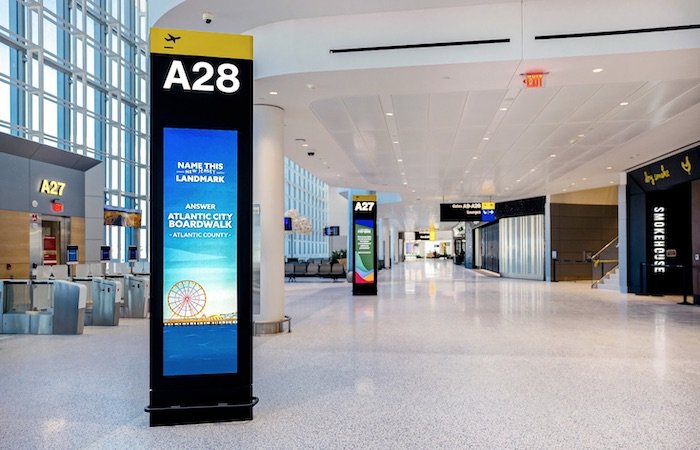
Digital signage turns a blank wall into your hardest-working employee. A lobby display welcomes visitors, a menu board updates prices in seconds, a breakroom screen keeps a shift informed, and a storefront display draws customers in from the sidewalk. Done well, signage pays for itself. Done poorly, it becomes a dark screen or a slideshow nobody reads.
Every successful project rests on three decisions: the screens, the players that drive them, and the content plan that keeps them worth looking at. The player decision has become the most confusing, with options ranging from a USB stick to cloud subscription services, so we'll spend extra time there.
Screens: commercial displays vs. consumer TVs
It's tempting to buy a TV from a big-box store and hang it in the lobby. For signage, that usually costs more over time.
Duty cycle. Professional displays are rated for 16/7 or 24/7 operation. Most Professional displays include extended warranties with advanced replacement. Warranties range from three to five years. Some come with a three-year advanced replacement warranty.
Consumer TVs are designed for a few hours of evening viewing. They lack the same “gorilla” or high-impact glass and non-reflective coating options. Running them all day can shorten their life. Consumer TV manufacturers do not honor warranties for consumer TVs used in commercial applications.
Brightness. Indoor entry-level professional displays typically run around 350 to 700 NITs. Window-facing and outdoor displays need 2,500 NITs or more to stay readable in direct sun. Box-house consumer TVs can average 250 to 400 NITs. You can buy a consumer TV with 2,000 NIT brightness, but it will cost more than professional units and won’t include internal PCs, digital signage players, or commercial video connectivity.
Orientation. Professional panels are built to run in portrait mode for menus, directories, and posters.
Management. Professional displays can be scheduled, locked, and monitored over the network, so a visitor can't change the input with a remote.
Built-in signage players. Most professional displays have options or include a system-on-chip (SoC) player, which can eliminate external hardware entirely (more on that below).
LCD displays from Samsung, LG and Sony
Samsung Pro displays run Samsung's Tizen operating system and pair with Samsung VXT, a cloud-native platform that succeeds MagicINFO. VXT combines a CMS, the VXT Canvas design tool, and VXT Players in one product, with remote device management and energy monitoring. It plays on Tizen 6.5 and newer displays and on Android devices.
LG Pro displays run LG's webOS signage platform on a built-in SoC. LG SuperSign CMS manages content, and the optional LG ConnectedCare cloud service remotely monitors display health so customers find problems before they notice.
Sony BRAVIA Professional Displays include a built-in Android SoC, so many signage apps run directly on the screen with no set-top box or PC. The included BRAVIA Signage Free app plays videos, photos and HTML content from internal storage or a USB stick, and a wide range of third-party CMS platforms support BRAVIA natively.
Direct-view LED from NanoLumens and Absen
For a lobby feature wall, storefront, or large retail display, direct-view LED (dvLED) creates seamless, bezel-free images at virtually any size and brightness.
NanoLumens (Duluth, Georgia) is a U.S.-based designer and manufacturer of dvLED displays celebrating its 20th anniversary in 2026. Its lineup includes the NanoPanel 55, which brings dvLED into a standard 55-inch flat panel format; the Captivate All-In-One LED display; the Engage Pro cabinet platform; and the NXT and Nixel series for custom shapes and curves.
Absen is a global LED display leader with products for corporate, retail, and control-room applications. Its CL V3 MicroLED series targets corporate lobbies and flagship retail, the X Series all-in-one LED displays (such as the 136-inch X136 V2) install almost like a giant flat panel in conference rooms, and fine-pitch lines such as the PO and ALT series suit high-resolution signage.
Players: what drives the content
Every signage screen needs something to store, schedule, and play content. Here are the four main approaches, from simplest to most capable.
1. USB drive playback. Many professional displays can loop photos and video directly from a USB stick. It is inexpensive and simple for a single screen, but every change means someone has to walk to the display with a new drive. They offer no time-of-day scheduling, no remote monitoring, and no way to know if the screen went dark. It's fine for a trade-show booth or a single waiting room, not for a business that wants to keep content fresh.
2. Built-in SoC players. The player built into Samsung, LG, and Sony professional displays runs signage software directly on the screen. Content is managed over the network from a CMS, so you don’t need an extra box to mount, power, or fail. For most single-zone screens, menu boards and lobby displays, this is the best value. The limitations: SoC processors have less horsepower for complex layouts, multi-zone video, 4K video walls, or interactive applications, and you're tied to software that supports that display's platform.
3. "Puck" PCs and streaming sticks. Small Windows PCs or consumer streaming devices can drive a screen and run almost any software. They look inexpensive, but they're built for personal use: operating system updates, pop-up notifications, sleep settings, and consumer-grade storage and cooling all create reliability problems on a screen that runs all day. Security patching and remote management become your IT team's job. They make sense only when a specific application requires Windows and is properly managed.
4. Dedicated signage players. Purpose-built players are hardened for 24/7 operation with locked-down operating systems, reliable storage, frame-accurate sync for video walls, and remote management. They handle richer content, live data feeds, interactive touchscreens, and synchronized multi-screen playback, and you can upgrade them without replacing the display.
Subscription services vs. owning your software
How you manage content matters as much as the hardware.
Cloud subscription CMS platforms, such as Samsung VXT and many third-party services, charge a recurring fee per screen. In return, you get web-based management from anywhere, templates, app integrations, automatic updates, and vendor-hosted servers. For multi-location businesses or teams without IT staff, the subscription often pays for itself in convenience.
Licensed or on-premise software, such as LG SuperSign CMS or Visionary's PackeTV, runs on your own network. That can lower long-term costs for larger installations and keep content inside your firewall, which matters to healthcare, government, and security-conscious organizations.
Questions to ask: What is the total cost per screen over five years? Who builds and updates the content? Does the software support the displays and players you already own? What happens to your content if you stop paying?
Distributing live video and controlling the system
When the same live video or presentation needs to reach many screens, AV-over-IP and IPTV systems carry it over your network.
Visionary (Santa Barbara, California; founded 1995) makes AV-over-IP encoders and decoders, including its 5 Series, plus the PackeTV IPTV and digital signage platform. PackeTV is an on-premises, browser-managed system that distributes live TV, video-on-demand, custom channels, and digital signage across an IP network, a strong fit for corporate campuses, healthcare facilities, cafeterias, and sports venues.
Aurora Multimedia (New Jersey) builds high-performance AV-over-IP, including the IPX 10Gb SDVoE series for uncompressed 4K60 4:4:4 video and the VPX 1Gb series, along with ReAX web-based IP control. ReAX can automate display power, input switching, and schedules across the network, so screens turn on before opening and shut off at closing without anyone touching a remote.
Placement and mounting
Mount screens where people naturally pause: reception desks, elevator lobbies, checkout lines, and waiting areas.
Keep the center of the screen near eye level for close viewing, higher for screens read across a room.
Avoid placing screens opposite windows where glare washes out the image, or choose a high-brightness display.
Plan power, network, and conduit before drywall goes up when possible, so cables stay hidden.
Use commercial-grade mounts rated for the display's weight, especially for portrait, dvLED or ceiling installs.
Content planning: where most signage fails
The screen is the easy part. Content is what makes signage effective, and it needs an owner.
Define the goal for each screen. Welcome guests, sell a product, reduce perceived wait time, or share safety and production metrics. One screen, one primary job.
Write for a glance. Most viewers look for only a few seconds. Keep headlines short and limit each slide to one message.
Size text for distance. A practical rule of thumb is about one inch of letter height for every 10 feet of viewing distance.
Use motion carefully. Subtle motion draws the eye. Constant flashing feels like an ad and gets ignored.
Schedule by daypart. A restaurant shows breakfast in the morning and dinner in the evening; an office shows visitor welcomes during business hours and company news at lunch.
Mix in live data. Weather, news, calendars, point-of-sale data, and production dashboards keep screens fresh without constant manual updates.
Set an update rhythm. Assign someone to refresh content weekly or monthly. Stale content teaches people to stop looking.
Common business applications
Corporate lobbies: visitor welcomes, company story and wayfinding, often on a dvLED feature wall.
Restaurants: digital menu boards with instant price and item changes.
Retail: promotions, product video and high-brightness window displays.
Manufacturing and warehouses: safety messages, production metrics and shift announcements.
Healthcare and service businesses: waiting room information and live TV distribution.
Conference rooms: room schedules and booking panels outside each door.
Get signage that works on day one and year five
Advanced Sound & Communication has designed, installed, and supported audio and video systems for Kansas City businesses since 1998. We help you choose the right displays from Samsung, LG, Sony, NanoLumens, and Absen, pick the right player and software for your budget, distribute video with Visionary and Aurora Multimedia, and set up content management your team can actually run.
Ready to put your screens to work? Contact Advanced Sound & Communication at advancedsoundkc.com for a digital signage consultation.