
Whether your church has non-dimmable or dimmable LED lights, or “old-school” incandescent bulbs, you need a way to control them. Everyone notices when the lighting is good and when it is bad. People don’t realize how hard it can be to control lighting without a centralized church lighting control system.
What a Church Lighting Control System Includes
When people say "lighting control," they usually picture a wall panel with several round knobs or sliders in the tech booth. In a well-designed system, modern controllers replace those limited, older controls.
Console controller – where looks (scenes) are built, stored, and recalled.
Infrastructure – Wireless DMX transceivers, DMX cable, or Ethernet cable carrying DMX data that runs from the controllers to fixtures, dimmers, and/or LED drivers.
Wall stations and preset panels – simple buttons by the doors or the platform that recall house-light and stage looks without opening the console.
Power control – relays, dimmers or breaker panels that turn fixtures on and off safely and on schedule.
When these pieces are planned together, the system is easy to run.
Step 1: Match the Console to Your Fixtures and Your People
When designing control systems, we answer two questions: How many things are we controlling? And who will run it?
Count what you're controlling
Older incandescent rigs used one control channel per dimmer. LED fixtures are different. A single LED wash light may need anywhere from a few channels to a dozen or more for intensity, color, white balance, and strobe, and moving lights need even more. A DMX512 "universe" carries 512 channels, so a modest platform with LED washes, a few moving heads and house lights can fill more of a universe than you'd expect. Learn Stage Lighting's console guide makes the same point: count your fixtures first, then size the console to them, rather than shopping on price.
Three ways to run a lighting rig
Today's lighting control comes in three basic forms. Understanding the difference is the single most useful thing a pastor, worship leader, or facilities manager can know before talking to a vendor.
1. Software-only control. Free or low-cost lighting software runs on a laptop or desktop and sends lighting data over the network (Art-Net or sACN) to a node that converts it to DMX. You program and run everything with a mouse, keyboard, or touchscreen.
Best for: tight budgets, small rooms, offline programming at home, or a backup copy of the show.
Watch out for: no physical faders for live moments, reliance on a general-purpose computer (Windows updates and sleep settings at 9:59 on a Sunday), and a network node to buy and maintain.
2. Software plus a USB controller (wing or interface). The same software, with a dedicated hardware surface plugged into the computer by USB. The surface adds real faders, buttons, and encoders, often DMX outputs, and in some systems it unlocks output that the software alone can't provide. Some manufacturers call these "connect" surfaces or wings; older systems used a USB dongle that simply licensed the output.
Best for: churches that want hands-on control and room to grow without the cost of a full console, or a programmer who wants to bring the show home.
Watch out for: you're still depending on a computer, so it needs to be a dedicated machine with updates managed on your schedule.
3. A dedicated console. Everything- computer, screens, faders, encoders, and outputs- is built into one purpose-made desk with an operating system designed for lighting.
Best for: most sanctuaries with LED and moving fixtures, multiple services, and rotating volunteers. Dedicated consoles start up the same way every time and are built for live use.
Watch out for: higher upfront cost, and you'll want to size it for where your rig will be in five to ten years.
The same Learn Stage Lighting guide offers a good tie-breaker: think about how often you reprogram. If looks are built once and replayed every week, you need strong playback, not a wall of programming keys. If your team builds new looks for every series, encoders and programming tools matter more. A Church Executive article on worship lighting adds a scale check: a large rig of moving lights can't be run well from a simple two-scene fader board.
For most churches we serve, the answer is a console (or software and a wing) that a trained person programs and volunteers play back.
The ChamSys Family: From Free Software to Stadium Consoles
ChamSys, part of the Chauvet family since 2017, covers all three approaches with show files that move between its products. That means a church can start small and move up without rebuilding its looks.
MagicQ software (software-only)
According to ChamSys, MagicQ PC is free for Windows, Mac and Linux and outputs 64 universes over Art-Net, sACN or Pathport with no hardware required. It's a powerful way to learn, pre-program a new series at home, or keep a backup of the show on a laptop.
MagicQ Connect surfaces (software plus USB hardware)
ChamSys's "Connect" surfaces plug into a computer running MagicQ and add hands-on control:
MagicQ Compact Mini Connect – a USB-powered surface with 10 playback faders, a Grand Master, one direct DMX output and a network port, per ChamSys.
MagicQ Compact Connect – adds 8 attribute encoders, two direct DMX outputs and a crossfader; ChamSys notes it outputs its universes without additional licenses or dongles.
MagicQ Stadium Connect – a larger programming surface with motorized faders, encoder playbacks and four DMX outputs, for teams that want a full-size feel from a computer.
MagicQ and QuickQ consoles (dedicated)
QuickQ is ChamSys's simplified line, built around a multi-touch screen and a smartphone-style interface that the company says is designed for volunteers and part-time operators. The QuickQ 10, 20 and 30 cover one, two and four universes respectively, and the newer "plus" models add a larger 11.6-inch screen and more network output. ChamSys also offers a free QuickQ Designer offline editor.
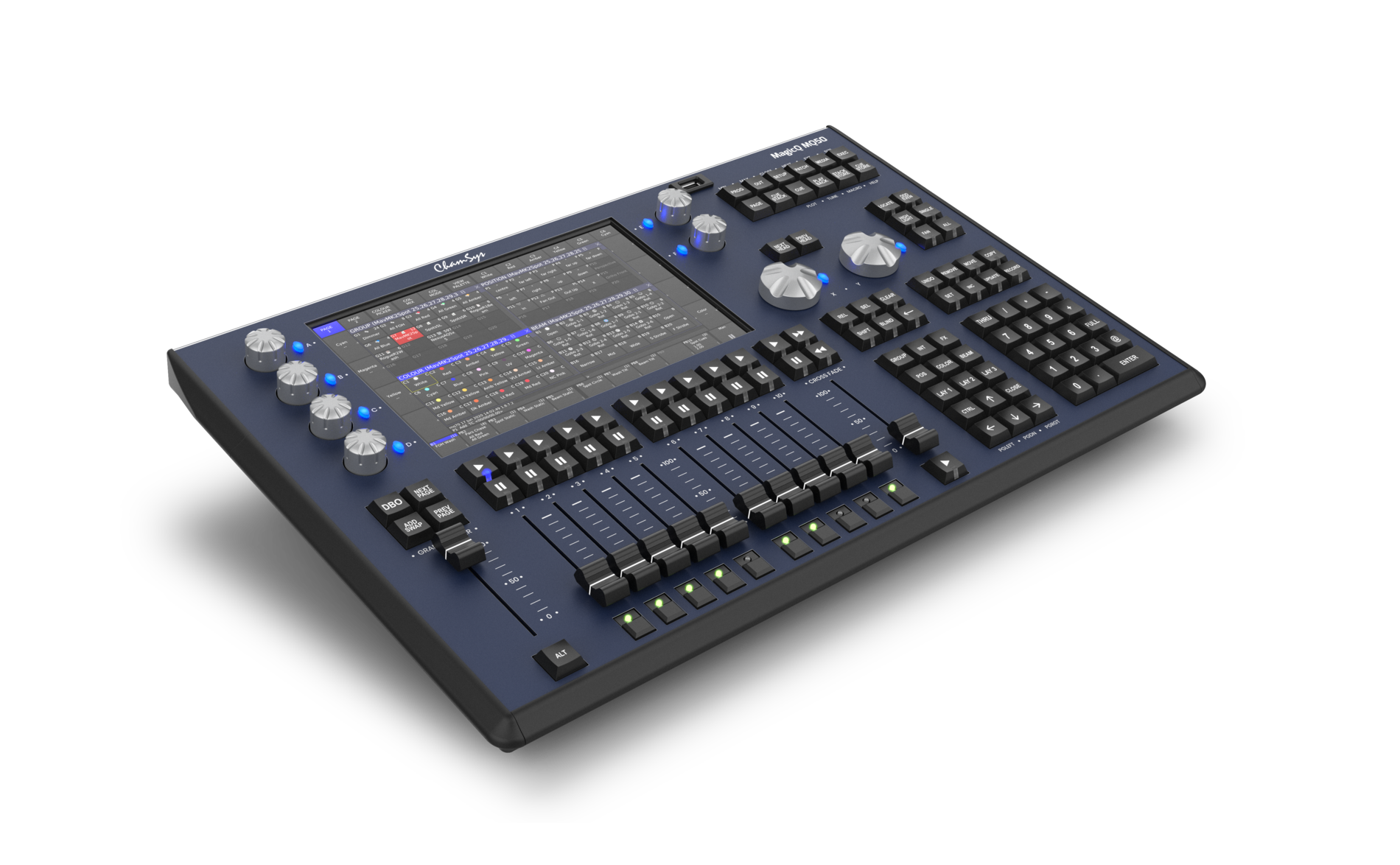
MagicQ consoles cover the full range: compact desks like the MQ50 and MQ70 with 10.1-inch touchscreens, and the Stadium consoles (MQ250M and MQ500M+) with motorized faders and large multi-touch displays for big rooms and complex services.
The key advantage for churches: ChamSys says show files can move between QuickQ and MagicQ consoles and software. (QuickQ keeps only the features it supports when loading a MagicQ show.) A volunteer team can run QuickQ in a chapel or youth room while the main sanctuary runs MagicQ, all from one ecosystem.
ADJ AX2: A Compact Console Built on ONYX
ADJ, which says it has been headquartered in Los Angeles since its founding in 1985, recently began shipping the AX2, a compact, fully integrated lighting console powered by the ONYX platform from ADJ's sister company, Obsidian Control Systems. ADJ lists houses of worship among its target users.
Per ADJ's specifications, the AX2 includes:
Up to 32 universes of DMX processing, with four DMX/RDM ports on the back and two gigabit network ports for Art-Net, sACN and ONYX X-Net.
A 15.6-inch 1080p touchscreen that folds down for transport, plus a smaller secondary touchscreen.
10 playback faders, each with four assignable buttons, along with encoders, a numeric keypad and a dedicated Go/Pause section.
A built-in computer running Windows 11 IoT Embedded, so no separate PC is required, plus outputs for external displays.
For a church, the AX2 sits in the dedicated-console category with plenty of headroom for large LED rigs, moving lights and multiple rooms, in a footprint that fits a typical sanctuary booth.
Step 2: Plan the Data Path (DMX, sACN and Art-Net)
Every console has to get its instructions to the fixtures. Traditionally that meant daisy-chained DMX cable. Today, many systems carry lighting data over Ethernet using sACN (ANSI E1.31, an ESTA standard for streaming DMX over IP networks) or Art-Net, then convert it back to DMX near the fixtures.
Networked lighting data makes sense when you:
Have more than one universe of fixtures,
Need control points in several places (booth, platform, balcony, overflow room),
Want to add an LED wall, a second venue or a youth room later.
Luminex, a Belgian network specialist, makes LumiNode processors that convert Ethernet to DMX, and GigaCore switches that the company says come pre-configured to carry lighting and AV protocols such as Art-Net and Dante without IT configuration. That matters in a church where the lighting network shouldn't depend on the office IT closet, and where audio and lighting may share infrastructure.
A practical tip: label every DMX line, node and universe, and keep a printed patch sheet in the booth. When something goes dark on a Sunday, that sheet saves the service.
Step 3: Give Everyone Else Simple Buttons
Not everyone who needs light should have to touch the console. The custodian opening the building, a pastor arriving for a midweek Bible study, a wedding coordinator on a Saturday – they need one-button looks.
DMX preset and snapshot stations. Doug Fleenor Design, which says its products are designed, built and serviced in the USA, makes the Preset 10 family. The company describes it as a device that captures up to ten "snapshots" from a lighting console and plays them back at the press of a button, with adjustable fade times. Its architectural version mounts in a standard single-gang wall box, and a portable version can act as a backup if the main console fails.
Console-linked button panels. Some control systems accept remote button panels too. ChamSys, for example, lists 10Scene ports on units such as the MagicQ Rack, MagicQ DIN and Compact Connect, so a simple panel can recall looks stored in MagicQ. We'll confirm what your system supports during design.
With these in place, the booth programs the looks once, and anyone authorized can recall "House Full," "Prayer," "Midweek" or "Cleaning" from the wall.
Step 4: Build Presets Volunteers Can Run
Here's the approach we use when we program a church system:
Start with the order of service. Build looks around what actually happens: walk-in, worship, prayer, announcements, sermon, communion, baptism, dismissal.
Name looks in plain language. "8:00” or “Weekday Mass."
Put the most-used looks on dedicated faders or buttons. Fewer menus, fewer mistakes.
Lock what shouldn't change. Keep programming functions out of reach for playback-only operators where the console allows it.
Set fade times in the cue. Smooth transitions shouldn't depend on a steady hand.
Include a "safe" look. A simple, even stage-and-house wash anyone can grab if something goes wrong.
Print a one-page cheat sheet and post it in the tech booth for quick reference by impromptu volunteers.
Back up the show file to a USB drive and a cloud folder after every change.
The Church Executive article also recommends getting staff and volunteers to manufacturer training. We agree, and we provide manufacturers reps and ASC staff for on-site training on your console with your service flow.
Common Control Problems We See
A console that only one person knows. If your lighting lead moves away, the church loses its lighting.
Fixtures patched over the years with no documentation. Overlapping addresses cause lights to flicker or respond to the wrong fader.
House lights on a separate, unrelated system. The room can't transition smoothly from worship to teaching.
No backup. A failed console with no saved show file can mean days of reprogramming.
All of these are fixable, often without replacing fixtures.
Why Work With Advanced Sound & Communication
Advanced Sound & Communication has designed, installed and serviced audio, video, lighting, security and control systems since 1998, and houses of worship are at the heart of our work. We're the sister company of Big Dude's Music, Kansas City's oldest privately owned music store. Our team of about ten full-time employees averages around ten years with the company, and every member is background-checked, insured and bondable. We never use volunteer, student or subcontracted labor. Our certified, OSHA-trained riggers handle overhead work safely, our in-house analog and digital technicians support what we install, and our mobile repair shop and tool truck reach churches across the metro, from Liberty to Lee's Summit and Olathe. We're an authorized dealer for everything we sell, including ChamSys, ADJ, Doug Fleenor Design and Luminex.
Let's Make Your Lighting Easy to Run
If your lighting depends on one person, or your volunteers dread the booth, we can help. Call Advanced Sound & Communication at 816.931.9525, email info@advancedsoundkc.com, or use our contact form. Send us a photo of your current console and a list of your fixtures, and we'll recommend a control plan that fits your room, your team and your budget. Learn more about our design, installation and service work, or browse lighting products in our Pro AV Catalog.