Qu-3 and Qu-3D. Same Core. Smaller Footprint.

Think Big, Go Small

Allen & Heath’s Qu's 32-channel 96kHz XCVI core, Everything I/O options, and modern workflow have been packaged within an 8+1-fader format, ideal for corporate AV, broadcast, installed audio, live sound, and home recording.


What's in the Mixer?

The Qu-3 might be small, but there's plenty onboard:

  • 36 inputs (32 mono/linkable, 2 stereo), 12 mixes and 4 matrices

  • 6 FX engines with 4 dedicated sends and 6 dedicated stereo returns

  • DEEP Processing ready

  • 32-channel Auto Mic Mixer

  • Gain Assistant, Feedback Assistant

  • 16 Mic/Line + 1 Stereo Line inputs

  • 8 Line + Stereo AES outputs

  • 128×128 SLink port

  • 32×32 USB-C audio interface

  • Multitrack recording via SD card

  • Stereo recording and playback through USB-A

In addition, the Qu-3D model features an integrated 16×16 Dante interface for straightforward integration into networked audio systems, making it well-suited to conferencing, installation, and broadcast workflows, with an optional 32×32 channel upgrade for those who need even more!

Contact Advanced Sound & Communication or our sister company, Big Dudes Music, to reserve yours!

Home Theater Installation in Kansas City: Costs, Design Choices, and What to Ask an Installer

Creating the perfect home theater experience should feel effortless and exciting! Imagine stepping into a space where stunning visuals fill your view, dialogue stays crystal clear at any volume, and the bass resonates powerfully without rattling the whole house. Plus, having one remote to control everything adds such convenience! However, this seamless experience doesn’t just happen—it comes from thoughtful planning.

Whether you’re transforming a basement in Lee's Summit, designing a media room in Overland Park, or crafting a dedicated theater in your new Olathe home, the choices you make before any installation begins will significantly influence your enjoyment for years to come. In this guide, we’ll explore the key factors that shape home theater costs, spotlight essential design decisions, and share important questions to ask any installer. Let’s make your dream home theater a reality!

What Drives Home Theater Installation Cost

When homeowners start to create their ideal space, it’s common to seek a price estimate upfront. However, it's important to consider various factors that can influence your budget:

1. Creating a dedicated theater vs. a more versatile family room.

2. Building out or finishing a basement (Electrical, Framing, Drywall, Finishing)

3. Choosing between a large flat panel, a projector, or an LED wall significantly affects your room layout and equipment needs.

4. Upgrading from a simple 2-channel system to a surround or Dolby Atmos setup can greatly enhance your audio experience and budget.

5. Custom construction or off-the-shelf noise abatement and acoustic treatment.

6. Lighting.

7. Automated shades.

8. Ongoing Support: Calibration, training, and post-installation service are crucial for protecting your investment.

For the best estimate, consider a site visit or a review of your plans to get a tailored quote based on your specific needs. Exciting possibilities await!

Design Choices That Make or Break the Room

Start with the room, then pick the screen size. When designing a room, experienced designers often start with furniture arrangement, which helps determine the ideal screen size for an engaging viewing experience. The right screen fills your field of vision from your main seating position—too small can strain your eyes, while too large may cause neck strain.

CEDIA and CTA guidelines offer valuable seating insights, but personal comfort is key.

Consider where you enjoy sitting in a cinema. Seat placement also affects sound quality; seats against the back wall can create bass "dead spots." Thoughtful layouts are essential, and for multiple seating rows, risers can enhance visibility and sound, creating an immersive environment for you and your guests. Let's create a fantastic space together!

Control the light.

Ambient light is the enemy of a projected image. In a dedicated, dark room, a standard projection screen performs beautifully. Some Kansas City media rooms have windows, light-colored walls, or an open floor plan, and for those, an ambient-light-rejecting (ALR) screen can make a projector viable where it otherwise wouldn't be. We like Screen Innovations, which designs and builds its screens and shades in Austin, Texas. Its Zero Edge fixed screens use a very thin aluminum bezel so the image looks like it floats on the wall. They can be paired with ambient-light-rejecting materials such as Slate and Black Diamond for rooms that can't be made fully dark. For multipurpose spaces, Screen Innovations' motorized screens can drop down only when it's movie time, and its motorized shades can darken the room at the touch of a button.

Speakers: free-standing, in-wall, on-wall, or in-ceiling

Most homeowners want great sound without big cabinets taking over the room. Architectural speakers solve that, but quality varies widely, and placement and installation matter as much as the brand on the box. These are the theater speaker lines we design with most:

  • Alcons Audio builds reference-grade private-cinema systems around its patented pro-ribbon tweeter, which stays clear and low in distortion even at full movie volume. Its CRMS speakers use the same mid- and high-frequency drivers in the screen, surround and height positions, so effects move around the room without changing character. The CRMSC-SRIW in-wall surround is under 4 inches deep.

  • JBL Professional has cinema in its roots: the company's founder built speaker components for MGM's movie-theater sound system in the 1930s, and JBL Professional still supplies speakers to commercial cinemas around the world. For larger private theaters, compact two-way Screen Array screen speakers such as the C221 and C222, paired with 8320 or 9300 surrounds, bring true cinema hardware home.

  • SoundTube Entertainment, right here in Lenexa, Kansas, builds its dARTS theater systems in the USA. Each dARTS system is a matched set of speakers and a digital amplifier calibrated to your room, with in-wall packages like the DIW660 and the DIW535, which add two in-ceiling height speakers.

  • Danley Sound Labs, based in Gainesville, Georgia, is known for horn-loaded speakers and subwoofers that play very loud with very low distortion. Its Cinema Line, including the CS-8CX and CS-100S surrounds and horn-loaded subwoofers, suits large dedicated theaters and screening rooms where typical home speakers run out of headroom.

  • Fulcrum Acoustic, built in Massachusetts, makes coaxial speakers, with the tweeter mounted in the center of the woofer, so the sound stays consistent from seat to seat. Its compact CCX speakers work well as surrounds and overhead speakers in larger rooms, and its Fulcrum Immersive division designs immersive audio for theaters and venues.

  • Theory Audio Design, based in Lake Forest, California, takes a system approach. Its slim on-wall, in-wall, and in-ceiling speakers are passive and run on Theory's own loudspeaker controllers, which combine amplification with digital signal processing tuned to those exact speakers. The SB25 on-wall and IW25 in-wall speakers deliver serious output in a profile slim enough for a living room, and its SB65, SB75, and SB85 soundbars are sized to match 65- to 85-inch screens.

Ceiling-mount theater speakers

Immersive formats such as Dolby Atmos add height (overhead) speakers to a traditional surround layout, and in most rooms those speakers go in or on the ceiling. Getting their positions right relative to the seats is a design task, not guesswork, and it's one of the most common things DIY and big-box installs get wrong. Here's what we look at:

  • In-ceiling or on-ceiling. Flush in-ceiling speakers disappear behind a paintable grille. Surface-mounted (on-ceiling) speakers can be aimed right at the seats and usually play louder and lower, which matters in larger rooms and under high or sloped ceilings.

  • Aim and coverage. Overhead speakers should point toward the listeners. Pivoting tweeters or rotatable horns help when joists keep a speaker from going exactly where the layout calls for it.

  • Matching voices. During a movie, sound moves from the screen to the walls to the ceiling. Height speakers that share drivers, or at least the same tonal character, with the front and surround speakers keep that movement seamless.

  • What's above the drywall. Joists, ductwork, sprinkler lines, and fire-rated ceilings decide which models fit. Back boxes keep sound from leaking into the rooms upstairs. Ceiling options from the brands above include Theory's ic6 6.5-inch in-ceiling speaker, the dARTS DC660R in-ceiling height speaker (the dARTS DIW535 in-wall package includes two), Alcons' compact CRMSC-SRHV surround, which doubles as a height speaker, Fulcrum CCX compact coaxials surface-mounted overhead in larger rooms, and JBL Professional's Control Contractor in-ceiling speakers for media rooms and multi-use spaces.

Don’t skip acoustics

Hard drywall, tile, and glass reflect sound and smear dialogue. A modest amount of well-placed absorption and diffusion, along with rugs and upholstered seating, makes a dramatic difference, often more than upgrading the speakers. Bass management and subwoofer placement deserve the same attention, because the room itself shapes low-frequency response.

Make it simple to use

The most impressive theater fails if only one person in the house can turn it on. A well-designed control system brings the display, audio, lighting, and shades together under one interface, with simple "Watch a Movie" and "All Off" buttons. Good training at handoff matters just as much.

What to Ask a Home Theater Installer

Before you hire anyone for a home theater installation in Kansas City, ask:

1. Who will do the work? Will the people in your home be the company's own employees, or subcontracted labor? If the laborers are interns or volunteers, injuries or death become the homeowner’s liability.

2. Are your technicians background-checked and insured? They'll be in your home for days.

3. Will you design the room, or just mount equipment? Ask how they determine screen size, seating position, and speaker placement.

4. Are you an authorized dealer for what you sell? Authorized dealers can properly support manufacturer warranties.

5. How is the system calibrated and tuned once it's installed?

6. What training do we get, and what happens when something needs service? Ask about response times, and who you call in year three.

Why Kansas City Homeowners Choose ASC

Advanced Sound & Communication has designed, installed, and supported audio, video, lighting and control systems since 1998. We're the sister company of Big Dude's Music, Kansas City's oldest privately owned music store. Here's what that means for your theater: Our own team, every time. About ten full-time employees with an average tenure of ten years. Everyone is background-checked, insured, and bondable. We never use volunteer, student, or subcontracted labor. In-house technical depth. Analog and digital technicians, certified riggers, OSHA training, and a mobile repair shop and tool truck to keep your system running. Authorized dealer in good standing for every brand we sell, including Alcons, JBL Professional, SoundTube, Danley, Fulcrum Acoustic, Theory Audio Design and Screen Innovations.

Professional-grade experience

Our work spans performing arts centers, recording studios, houses of worship, and professional home theaters, and it has been featured in industry trade publications. We bring that same rigor to your basement or media room. We serve homeowners across the metro, including Overland Park, Leawood, Lee's Summit, Olathe, Independence, Liberty, and beyond. Browse our recent projects, see our full range of design, installation, and service offerings, or explore products in our Pro AV Catalog.

Ready to Plan Your Home Theater?

Whether you're pre-wiring a new build or reimagining an existing room, the best time to talk to an integrator is before you lock in decisions. Call us at 816.931.9525, email brent.handy@advancedsoundkc.com, and send us your room photos and plans, and we'll set up a consultation.

Patio and Outdoor Sound for Breweries, Taprooms and Restaurants: Choosing Commercial Outdoor Speakers

A good patio keeps tables full well into the evening. The sound system out there has a harder job than the one inside: it has to survive Kansas City summers, ice storms, and spring hail; cover tables evenly without blasting the closest ones; and stay on the right side of the neighbors. This post walks through how we approach commercial outdoor speakers for breweries, taprooms, wineries, and restaurants, and what to ask before you buy.

Why USE Commercial Outdoor Speakers, Not Consumer "Patio" Speakers

Consumer outdoor speakers are built for a backyard that gets used on weekends. A restaurant or club patio might run music twelve hours a day, seven days a week, from March to November. Commercial outdoor speakers are designed for that duty cycle, and they offer features businesses need: transformer taps for 70-volt operation, rust-proof mounting hardware for permanent installation, and published weather ratings you can compare from one brand to the next.

What are IP ratings?

Most commercial models list an IP (ingress protection) rating under the IEC 60529 standard. The first digit covers dust and solids; the second covers water. A 4 in the second position means protection from splashing water, a 5 means protection from water jets, and a 6 means protection from powerful jets. For a patio under a roof or deep eave, a rating like IP44 or IP45 is often fine. For a speaker fully exposed to driving rain, or one the staff hoses down at closing, look for IP55 or higher.

Most patio systems we design run on 70-volt (constant-voltage) distribution. Each speaker has a transformer with selectable "taps," so you can run several speakers on one amplifier channel over long cable runs. This lets you place the amplifier on the opposite side of the building with minimal loss of power or sound quality. We can also tap the speakers differently so that multiple speakers on the same amplifier channel can provide different volumes if needed. That matters outdoors: the speaker over the corner table near the fence can be tapped down while the ones over the center of the patio run hotter.

Low-impedance (8-ohm) operation still has its place. It is common for higher-output systems where the patio doubles as a stage, and for subwoofers. Many current commercial outdoor speakers let you choose: the AtlasIED SM82T, AUDAC WX802MK2/O, JBL Control 28-1, and RCF GS 60 all offer both transformer taps and a low-impedance bypass. That gives you room to change the design later without replacing speakers.

Choosing a Speaker Style: Surface Mount, Landscape or Pendant

The building and patio layout usually decide the speaker style. They are the most common choice. They mount to the building structure, an eave or a pergola beam, or a wall. For a large beer garden or a patio that hosts bands, a larger weather-resistant speaker may be a better fit.

Landscape satellites with in-ground subwoofers are very popular. Soundtube Rockustic Rock speakers look like organic rocks. The longer they are exposed to the elements, the more they look like natural rocks. Rock speakers blend into the landscape surrounding beer gardens, wineries, and patios. Planter speakers hold plants and look great in flower beds around patios.

Hidden speakers: SoundTube SolidDrive in walls and on glass

Sometimes the best-looking speaker is the one nobody sees. SolidDrive, a SoundTube brand from MSE Audio, makes sound transducers that mount behind drywall or onto glass and turn the surface itself into the speaker. No grille and no cutout, which suits a taproom with a design-forward interior or a restaurant whose patio is lined with windows. The SD1 mounts behind drywall on a balanced spring bracket, and the wall is taped and finished over it, so nothing shows. The SD1g attaches to glass with a high-bond double-sided adhesive disc. On a storefront or a wall of windows beside the patio, one pane can carry music to people on both sides of the glass. Transformer versions such as the SD1-T run on the same 70-volt lines as the rest of the system.

Because the wall or window becomes the speaker, sound spreads evenly and drops off more slowly with distance than it does from a conventional in-wall speaker. Each unit needs equalization for its surface, either the matching passive EQ module or a preset in the DSP, and bass is limited, so we add a subwoofer when the music calls for it. SolidDrive units are not weather-rated, so they go in interior walls and on the inside face of the glass. Placement matters too: the glass install guide calls for a large pane, about 20 square feet, with units a few inches in from the frame.

Keeping Patio Sound on the Patio

Many Kansas City-area cities, including Overland Park, Lee's Summit, Olathe and Kansas City itself, have noise rules that apply to outdoor music, and special-event or liquor permits may add their own conditions. The limits and quiet hours vary by city and sometimes by zoning, so check with your city before you design the system, not after a complaint. Generally, noise should not exceed 75dB at the property line before 7:00 a.m. and after 7:00 p.m.

We use more speakers at lower volumes rather than a few loud ones. Even coverage means no one has to turn it up to reach the far tables. We select the correct size and dispersion. We aim speakers down and in toward the center of the building, or toward the center of the space, not out toward the property line.

We pay attention to bass. Low frequencies travel farthest and go through walls. A subwoofer that is set conservatively and limited by the sound system controller after a certain hour can save a lot of trouble.

Venues often subscribe to music services. Music servers are connected to the internet. The server streams pre-selected playlists. Some services offer scheduling, so you can decide when the music volume needs to increase for “the rush,” then turn it off when the patio is closed. We can lock down the maximum level so the patio cannot exceed a specific loudness level.

Zones, Schedules and Control from the Bar

The speakers are only half the system. A digital signal processor (DSP) is what makes a patio system manageable day to day. With a DSP in the rack, the patio becomes its own zone with its own source, volume, and limits, separate from the dining room, bar, and restrooms.

Scheduling is one of the most useful features. Schedule events to run once or on a daily, weekly, or monthly basis. That means the patio can drop to a lower level at a set time every night without anyone having to remember. Staff control should be simple. A wall control panel does the same job for anyone who doesn't want to pick up a tablet or phone. Controls can be limited so a bartender adjusts within a range but can't exceed the maximum.

Ambient noise compensation

A patio is quiet at 4 p.m. and loud at 8 p.m. on a Friday. Ambient noise compensation uses a sensing microphone to measure the crowd and adjust the music or announcements to match. Gain increases as background noise rises and pulls it back down when the space quiets. Set within limits, this keeps music at a comfortable level all evening without staff riding the volume.

We can recommend speakers, a wiring approach, and controls that fit the space and the budget. Advanced Sound & Communication has designed, installed, and serviced sound systems in the Kansas City area since 1998. Our in-house, background-checked staff handles the design, installation, and long-term support, and we are an authorized dealer for everything we sell. To talk through your patio, beer garden, or taproom, call us at 816.931.9525, email info@advancedsoundkc.com, or use our contact form. You can also see some of our past work on our projects page.

LED Walls and All-in-One LED Displays in 2026: What's New From Sony, Samsung, Nanolumens, Absen, and Unilumin, and Why the Name Behind the Screen Matter

On groups like https://www.facebook.com/groups/Smallchurchmedia, questions and advertisements about video pop up frequently. Churches see AI ads from "American" companies with prices that seem too good to be true. Low-cost LED displays/walls are tempting because the costs are closer to properly implemented video projection systems.


Our top nine questions churches should be asking include:

1. What LED packaging does this product use (SMD, COB, GOB, MIP), and why is it the right choice for our room?
2. Is it flip-chip and common cathode?
3. What is the typical and maximum power draw? How many 20A circuits are required?
4. What is the refresh rate, and how does it look on camera?
Is it calibrated at the module level, and how are replacement modules matched?
5. Is it front- or rear-serviceable? Does it need to be disassembled to replace a module, or can it be left in place?
6. Does it have backup power and data?
7. Does the unit ship with extra parts?
8. What is the warranty and process for repairing parts?
9. Will replacement parts automatically match the older parts in output, white, and color when installed?


Choosing the right pixel pitch: distance, content, budget and cameras:


Pixel pitch is usually the biggest single factor in what an LED wall costs and how it looks. Smaller is sharper, but it's also more expensive, so the goal is the right pitch for the room, not the smallest one available. These factors should drive the decision.

How close will the nearest viewers be? Start with the distance from the screen to the closest seat, desk, or walkway where people will actually look.

Common industry rules of thumb:
The 10x rule: multiply the pixel pitch in millimeters by 10 to get a comfortable minimum viewing distance in feet. A 2.5 mm wall works well from about 25 feet and beyond; a 1.5 mm wall from about 15 feet. We always aim for 0.9 mm for maximum "TV-like" reproduction.

Real-world comfort: many people find the image acceptable at roughly half the 10x distance, especially with video rather than fine text. Planar, for example, puts the average comfortable distance for a 2.5 mm wall at about 14 feet.

If most of your audience sits well back but a front row sits close, design for the people the screen is really for, and walk the room with the plans in hand before deciding.

What will be on the screen:
Video, photos, and motion graphics hide pixels well. Small text, spreadsheets, song lyrics, scripture, sermon notes, menus, dashboards, and video-call faces do not. If the wall will show detailed text, lean toward a finer pitch, or plan content with larger type.

How big the wall is and what resolution you need:
To determine the height of the wall/display, the AVIXA/ANSI standard is to measure the distance from the wall where the display will be mounted to the last row in the church and divide that distance by 8. That is the height in feet the display needs to be for a person with 20/20 vision to read text from the back row. You can always use larger fonts and fewer lines of text on a smaller screen. Some of our clients use floor-to-ceiling displays and project text in a ribbon near the top, allowing massive scenic video to surround the pulpit area. Some clients have low ceilings and must use smaller displays, more slides, and larger lines of text.

Resolution comes from simple math: wall width divided by pixel pitch equals pixels across. A 16-foot-wide wall (about 4,877 mm) at 2.5 mm is about 1,950 pixels wide, close to 1080p. The same wall at 1.5 mm is about 3,250 pixels, and you'd need roughly 1.25 mm to reach full 4K (3,840 pixels). A bigger wall can use a larger pitch and still hit the same resolution, which is why large sanctuary and gym walls often don't need ultra-fine pitch.

Budget:
Cutting the pixel pitch in half puts about four times as many pixels in the same area, and cost, power, and processing climb with it. Going finer than the room needs usually isn't the best use of money. You can often spend that difference on a bigger screen, better processing, spare modules, or a longer warranty.

Room light and brightness:
Pitch and brightness are separate choices, but both depend on the room. Windows, skylights, and bright house lights call for more brightness and a low-glare surface. Indoor walls rarely need to run near full brightness, and a wall that holds good color and smooth gradients at low brightness looks better in a dim sanctuary or theater.

Will the wall/display be on camera:
Anything that will be livestreamed, recorded, used for IMAG (image magnification), or shown behind a speaker or performer needs extra care, because cameras see things eyes don't.

Key factors:
1. Moiré: wavy or rippling patterns appear when the camera sensor's pixel grid clashes with the wall's pixel grid. It gets worse when the camera is close to the wall, or the wall is in sharp focus. A finer pitch, LEDs that fill more of each pixel (less black gap, which COB helps with), more distance between camera and wall, and keeping the wall slightly out of focus all reduce it. Turn off autofocus, which tends to lock onto the wall.

2. Camera distance: as a starting point, keep cameras at least 10x the distance from the wall, and farther for tight shots. If cameras will shoot the wall up close, choose a finer pitch than the audience alone would need.

3. Refresh rate: a low refresh rate shows up on camera as flicker or dark rolling bars. Ask for 3,840 Hz or higher for livestream and IMAG, and 7,680 Hz is common for broadcast and studio work.
Scan rate: each LED driver chip lights a group of rows in turn. A lower scan ratio (1:8 instead of 1:16 or 1:32) leaves more time to refresh each pixel and reduces banding on camera, especially with dark content.

4. Low-brightness performance: walls are usually dimmed for camera work. Look for high grayscale bit depth so dark scenes and skin tones stay smooth instead of turning blocky or banded.
Genlock and shutter settings: when the cameras and the LED processor support it, syncing them (genlock) removes most flicker. Otherwise, match the camera's frame rate and shutter speed to the wall and adjust slightly until the banding disappears.

5. Color temperature: match the wall's white point to your stage lighting so faces and the wall look natural together on camera.
Viewing angle: cameras are often off to the side or up high. Check that the wall's color and brightness hold up off-axis, so side cameras don't see a color shift.

Why the name behind the screen matters:
An LED wall is not a TV you replace every five years. It's built from thousands of individual LEDs, power supplies, receiving cards, and modules, and something will eventually need attention. When it does, what you need is a company that will still answer the phone. Here's what to look for.

A real warranty from the company that made it:
Read who is actually issuing the warranty. A manufacturer warranty is backed by the company that designed the product and controls its parts. An importer's warranty is only as good as the importer, and if that company closes or changes names, the warranty goes with it. Ask how long coverage lasts, whether it covers parts and labor, whether replacement parts are shipped in advance, and whether extended coverage is available.

Parts that match, years from now:
LEDs are sorted into batches by color and brightness. When a module fails three years in, the replacement has to match the modules around it, or you'll see a patch in the middle of the picture. Reputable manufacturers keep spare modules from your production batch, or tell you to buy spares with the original order, and they keep making compatible parts for years. A rebranded product may come from one factory this year and a different one next year, with no promise that anything will match.

Service and support in the United States:
When the screen goes dark the night before an event, a support line in another time zone with a three-week shipping window doesn't help much. Look for manufacturers with US offices, US warehouses, US-based technicians, and repair facilities. Nanolumens, Samsung, Sony, Absen, and Unilumin all operate in the US; Nanolumens designs its products here, and Unilumin runs its North American service and repair from Florida.

Ongoing software and controller support:
LED walls depend on processors, controllers, and firmware. Established manufacturers keep updating them and keep them working with the control systems your building already uses. Rebranded products often use generic controllers with little documentation and no updates, and the label owner may not get answers from the factory that actually built them.

How to spot a rebranded import:
1. The company has no engineering, factory, or design history of its own, just a sales office and a website.
2. The product looks identical to panels sold under several other names.
3. Spec sheets are vague about who makes the LEDs, the driver chips, and the controller.
4. The company cannot provide FCC, UL, or CE testing/certification documentation. If these devices are not certified and cause a fire, which has happened, your insurance company will not pay.
5. The warranty is short, unclear about labor, or requires you to ship modules overseas.
6. No one can tell you where spare parts are stocked or how long the model will be supported.
7. Rebranding isn't always bad. One company, like Absen North America makes plenty of good OEM products for other brands. The question is whether someone with real resources stands behind it for the life of the screen.

Two prominent forms of LED displays/walls exist: custom walls and all-in-one displays.
1. Cabinet-based LED walls are built from tiles (cabinets) that bolt together in almost any size or shape: wide, tall, curved, wrapped around a corner. They need a separate video processor and controller, and they're designed and installed as a system. This is the right choice for a stage backdrop, an outdoor sign, or a lobby feature wall.

2. All-in-one LED displays come as a complete kit in a fixed size, usually 108 to 220 inches. The kit includes the controller, power, mounting hardware, trim, and often speakers. Most of the engineering has been done. They target conference rooms, classrooms, lecture halls, and smaller sanctuaries.

2027 will be an interesting year because some of the most trusted names in projectors, TVs, and digital signage are entering the large-scale LED market. We will see a bridge between the largest TVs and smallest all-in-one solutions.

Sony's Crystal LED line is known for picture quality and its anti-reflection surface. This year Sony added the Crystal LED S Series, a mid-market line meant to bring that technology to more corporate, education, and commercial spaces. The two models, ZRD-S12G and ZRD-S15G, have 1.25 mm and 1.56 mm pixel pitch, 800 nits of brightness, the same low-reflection surface as Sony's premium BH Series, and a slim cabinet about 1.8 inches deep that runs cooler and uses less power than Sony's flagship models.
At InfoComm Show 2026, Sony also showed the Crystal LED UNIFY, a 135-inch all-in-one built from five pre-assembled display units and a control unit, aimed at corporate and education rooms. Sony has said it plans to ship UNIFY in early 2027.

Samsung Global's newest premium wall is The Wall MPF Series, a chip-on-board model rated at 1,000 nits with a 43,000:1 contrast ratio. It uses Samsung's AI processor to upscale content, and the redesigned cabinet is 35% thinner and 18% lighter than before. Modules can be pulled and replaced from the front, which shortens repair time. For rooms that need a simpler path, The Wall All-in-One comes in 110-inch and 146-inch sizes (2K or 4K at 146 inches). You choose by size and resolution, and the box includes the control unit, wall brackets, speakers, and trim. Samsung also offers The Wall M All-in-One at 1.5 mm pitch for meeting spaces.

Nanolumens' Engage Pro series is a cabinet-based fine-pitch wall, available down to 0.7 mm, that pairs with Nanolumens' Aurora video processing. This October, Nanolumens added 90-degree corner configurations, so Engage Pro can wrap columns and corners, and it added its first outdoor Performance Series model under 3 mm, good for viewing from about 14 feet. For conference rooms, there's the Captivate All-In-One, and the NanoPanel 55 puts direct-view LED into a standard 55-inch flat-panel shape for signage and menu boards. The Nixel series handles custom curves and unusual shapes.

Absen North America's Absenicon all-in-one family includes the X Series (COB micro LED in 136-inch and 163-inch sizes, with an optional touch version), the C Series ultrawide 32:9 models such as the 199-inch C199 at 1.27 mm, and the new X136F, a foldable all-in-one that debuted at ISE 2026. Absen sells in the US through its American subsidiary and offers extended warranty plans of one to three years beyond the standard term, plus repair, on-site service and training. This serious is not camera compatible.

The Unilumin UTV SC all-in-one uses COB technology in 108, 135, 162, and 217-inch sizes, includes built-in audio and wireless screen sharing, and can be controlled via RS-232 or IP from Crestron, Extron, and other control systems. Unilumin launched the ultra-thin UTV SCX all-in-one at ISE 2026. For custom walls, Unilumin offers fine-pitch lines like UminiIII Pro and Umicro, outdoor and sports displays, and a U-Kit package that bundles panels, controller, trim, and wall mount at one price.

How LED walls/displays are "packaged".
Two LED walls with the same pixel pitch and brightness on a spec sheet can look and hold up very differently. The difference is in how the LEDs are packaged, how the chips are wired, and how the cabinets are built. Here's what's going on behind the picture. Every pixel is a tiny red, green, and blue LED. How manufacturers mount and protect those LEDs is the biggest construction choice they make.

SMD (surface-mounted device): each pixel is a small plastic package holding the red, green, and blue chips, soldered onto the circuit board. It's the long-time industry standard; it costs the least, and a technician can replace a single bad pixel. At fine pitches, the packages are small and exposed, so a bump from a chair, a cleaning cloth, or a road case can knock pixels off.

4-in-1 (IMD): four pixels share one package. It's a middle step between SMD and COB, allowing finer pitches with sturdier mounting.

COB (chip-on-board): the bare LED chips are mounted straight to the board and sealed under one smooth protective layer. The surface resists impact, dust, and moisture; it can be wiped clean, and blacks look deeper. COB is now the go-to for fine-pitch walls and most all-in-one displays. The trade-off is repair: a damaged area means swapping the whole module rather than one pixel, so spare modules matter even more. Some COB surfaces are glossier, so ask about anti-glare treatment for rooms with windows or bright house lights.

GOB (glue-on-board): standard SMD pixels with a clear protective layer poured over them after assembly. It adds durability to SMD at a lower cost than COB and is common on rental and poster-style panels.

MIP (micro LED in package): microscopic LED chips are packaged individually and then mounted like SMD. It aims to combine COB-like image quality and toughness with SMD-style repairability and color sorting. It's newer, priced at the high end, and growing in very fine-pitch walls.

Inside the chip: flip-chip, wire bonds, and common cathode. Older LED packages connect each chip to its leads with hair-thin wires. Those wire bonds are a common failure point, and quality varies: gold wire holds up better than cheaper copper wire. In a flip-chip design, the LED chip is turned over and bonded straight to the board with no wires at all. That removes a failure point and gives heat a shorter path out of the chip.

Common cathode is a power design. In a traditional common-anode panel, red, green, and blue all get the same voltage, even though red needs less, and the extra is wasted as heat. Common cathode feeds each color only the voltage it needs. Flip-chip COB with common cathode typically runs cooler and uses noticeably less power than standard SMD, and cooler LEDs last longer: a common rule of thumb is that LED life drops sharply as operating temperature rises.

You'll also see "micro LED" and "mini LED." These describe chip size: micro LED chips are smaller than about 100 microns. Many premium walls and all-in-ones, including several mentioned above, use micro LED chips in a COB or flip-chip construction.
Color matching: binning and calibration

No two LEDs come off the line exactly alike. Good manufacturers sort LEDs into tight batches (bins) by color and brightness, build each wall from matching bins, and calibrate every module at the factory, so the whole wall looks even. Ask whether the wall is calibrated at the module level and whether the calibration data is stored in the modules, so you can match a replacement in the field. This is also why buying spare modules from the same production run matters.

Driver chips, refresh rate, and cameras. Behind the LEDs are driver chips that control how fast and smoothly each pixel updates. Better drivers give a higher refresh rate and finer grayscale, which means smooth dark scenes and no flicker or rolling lines when a camera points at the wall. For churches, schools and venues that livestream or record, ask for the refresh rate (3,840 Hz or higher is a common target) and, if possible, see the wall on camera before you buy.

How the cabinets are built:
Frame material: quality cabinets use die-cast aluminum or machined frames that stay flat and square. Flat, accurate cabinets mean tight seams with no visible lines or bright edges between panels. Cheaper steel or thin sheet-metal frames are heavier and more likely to flex.

Front or rear service: front-serviceable cabinets let a technician pull modules from the face of the wall, usually with magnetic mounts and a suction tool, so the wall sits tight against the building. Rear-service designs need a walkway behind the wall.

Cooling: most indoor fine-pitch walls are fanless, which keeps them silent in sanctuaries, classrooms, and boardrooms. That depends on good heat design in the cabinet and the chips.

Power and data redundancy: better cabinets offer backup power supplies and a second data path, so one failed component doesn't black out part of the screen mid-service or event.
Weather protection: outdoor cabinets need sealed construction rated for water and dust (IP65 or better on the front), and electronics built for Kansas City heat, cold, and storms.

Weight and mounting: a large wall can weigh thousands of pounds. The structure behind it, whether a wall, a ground-supported frame or rigging from above, needs to be engineered and installed by qualified people.

Samsung The Wall MPF uses chip-on-board construction with front-replaceable modules and a slimmer one-piece cabinet.
Sony Crystal LED S Series pairs Sony's LED technology with the same anti-reflection surface used on its premium BH Series.
Absen's Absenicon X Series and Unilumin's UTV SC all-in-ones use COB micro LED construction.
Nanolumens offers COB options in its NXT Series and fine-pitch Engage Pro cabinets, designed in the US.

Advanced Sound & Communication has designed, installed and serviced audio, video and lighting systems in the Kansas City area since 1998, for churches, schools, businesses, venues and homes. We'll help you compare options from manufacturers that stand behind their products, design the display around how you'll actually use it, and service it after it's up. Contact us to talk about an LED wall or all-in-one display for your space.

Microphone Tips For Christmas Productions

Microphone Tips For Christmas Productions

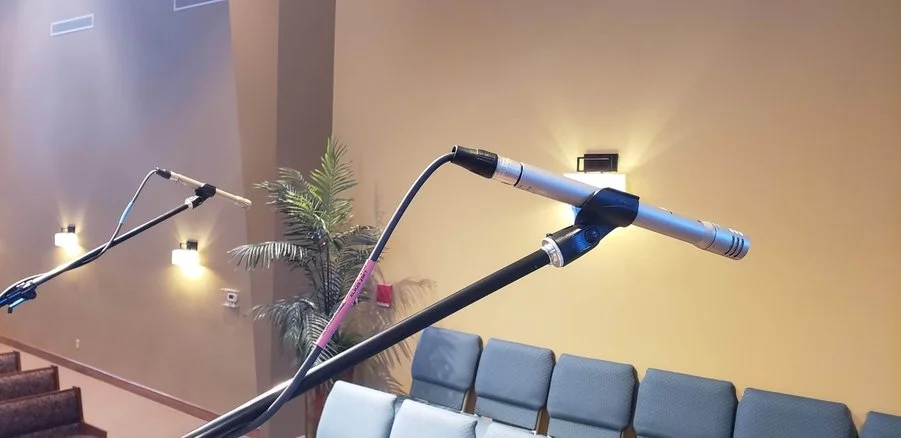
With Christmas around the corner, churches nationwide are preparing their choirs’ and bands’ musical performances. But choirs and bands can be challenging for musical directors, given how many microphones you’ll need on stage. Audio quality can seem unpredictable, and many congregations struggle to deliver clear, pleasant sound from the microphones to the speakers. 

Are microphones causing issues for your church, too? Microphones are integral to church audio-visual systems, and if your church in Kansas City, MO, needs help with microphones this Christmas season, here’s our advice. 

Wireless Microphones for Churches: Choosing, Coordinating and Maintaining a Reliable RF System

Few things derail a Sunday service faster than a wireless microphone cutting out or making noise mid-service. Wireless microphones give freedom to move, but they depend on an invisible radio spectrum and batteries that don't die at the worst moment.

Wireless technology is changing faster than at any time in decades. Analog systems are fading out, digital wireless has become the standard, and a new technology called WMAS is beginning to reshape how large wireless systems are built. Here's what church leaders need to know to choose, coordinate, and maintain a system that works every week and keeps working for years.

Start with how your church actually uses wireless

Before comparing brands, count your real needs. List everyone who needs a mic at your busiest service of the year (Christmas Eve and Easter usually win), not a typical Sunday.

  • Pastors and teachers usually do best with a headset or earset microphone, which stays at a consistent distance from the mouth.

  • Worship leaders and vocalists generally want handheld microphones with a capsule that suits their voice and rejects stage monitor bleed.

  • Instruments such as acoustic guitar, violin, or saxophone use bodypack transmitters.

  • Choirs, drama and children's programs may need several extra channels a few times a year.

  • In-ear monitors are also wireless systems and use the same spectrum, so include them in your count.

That channel count, plus a couple of spares, is what your system and frequency plan must support.

Analog wireless is on its way out

For decades, nearly every church wireless mic was analog: the transmitter sent a frequency-modulated radio signal, and a compander squeezed and expanded the audio to reduce noise. That approach worked, but the market has moved on.

  • Manufacturers are retiring analog lines. Shure replaced its original analog SLX years ago with the digital SLX-D, which in early 2026 was succeeded by the SLX-D+. Across the industry, new mid-range and professional product launches are digital.

  • Spectrum keeps shrinking. Since July 2020, wireless microphones have been prohibited from operating in the 617–652 MHz and 663–698 MHz ranges after the FCC's 600 MHz auction. Analog systems, which need wide spacing between channels, fit fewer microphones into the remaining space.

  • Analog is now mostly entry-level. Manufacturers still sell analog systems for simple, low-channel-count uses, but they no longer invest in new features. Entry-level system body packs produce more noise and less signal because they lack sufficient bias to make the most of high-quality lapels or earset mics, which require more power to work.

If your church still runs analog wireless, especially any gear in the 600 MHz range, now is the time to plan the move to digital.

Why digital wireless is now the norm

Digital wireless converts the microphone signal to digital audio before transmission. That brings real advantages to a church:

  • Cleaner, more natural sound. No compander means no pumping or breathing artifacts, with wide dynamic range for both a whispered prayer and a full-voice worship leader.

  • More channels in less spectrum. Many digital systems can be packed closer together, and some suffer far less from intermodulation, so a crowded room fits more microphones.

  • Encryption. Many systems offer AES-256 encryption, which keeps counseling sessions, prayer times, and private meetings from being picked up by a scanner.

  • Network audio and remote management. Dante outputs send audio directly to digital mixers, and software lets your tech team monitor battery life, signal strength, and interference from one screen.

  • Rechargeable batteries with runtime reporting. No more guessing whether a pack will last through the second service.

Brands we recommend

Advanced Sound & Communication designs church wireless systems around the leading names in the industry:

  • Shure (Niles, Illinois) – The most familiar name in worship audio. The new SLX-D+ adds ShowLink Ease two-way communication between receiver and transmitter, remote management and feedback suppression, making it a strong fit for small and mid-size churches. QLX-D and ULX-D step up for larger rooms, and Axient Digital serves high-channel-count productions. Shure's free Wireless Workbench software handles coordination and monitoring.

  • Sennheiser – The Evolution Wireless Digital (EW-D and EW-DX) lines bring digital performance to churches at accessible price points, with app-guided setup and very efficient frequency spacing. At the top of the range, Sennheiser leads the industry into WMAS with Spectera (more below).

  • Audio-Technica (U.S. headquarters in Stow, Ohio) – The new D50 Digital UHF Wireless System, introduced at InfoComm 2026, was designed for high-density RF environments including houses of worship. It offers up to 138 MHz of tuning range in the U.S., AES-256 encryption, onboard spectrum analysis, internal DSP, and half-rack receivers with up to eight channels of Dante audio in a single rack space. For smaller rooms, the license-free System 20 PRO 2.4 GHz system scales to 20 channels with no frequency coordination.

  • Audix (Wilsonville, Oregon) – Audix entered professional digital wireless in 2026 with Novacore: 24-bit audio, AES-256 encryption, sub-3 ms latency, single, dual and quad receivers (with Dante on the dual and quad), and a price of roughly $699 per channel. Of special interest to churches, Novacore includes wireless MicroBoom choir microphones, plus retrofit kits to convert existing wired MicroBooms.

  • MiPro – Known for its one-touch ACT sync, MiPro offers the ACT-800 series of wideband, encryption-capable digital UHF receivers, including Dante-equipped dual and quad models. License-free 5.8 GHz (ACT-5800) and 2.4 GHz (ACT-2400) digital systems are a smart choice for classrooms, chapels and fellowship halls.

  • Lectrosonics (Rio Rancho, New Mexico) – An American manufacturer since 1971, built for broadcast, film and theater. The D Squared fourth-generation digital platform and Duet digital in-ear monitor system deliver studio-quality audio and rugged reliability, ideal for churches producing video or broadcast content.

The future: WMAS (Wireless Multichannel Audio Systems)

Every conventional wireless mic, analog or digital, is a narrowband system: one transmitter, one receiver channel, one frequency of up to 200 kHz. Each new mic means another frequency to coordinate. WMAS changes that model.

In February 2024, the FCC adopted rules allowing WMAS in the United States on both a licensed and unlicensed basis. A WMAS system combines many audio channels into a single wideband carrier, up to 6 MHz wide (the width of one TV channel). Unlicensed WMAS can operate at up to 100 mW, twice the power allowed for unlicensed narrowband microphones.

What WMAS means in practice:

  • Far more microphones per MHz. Instead of coordinating dozens of individual frequencies, you coordinate one wideband channel and add microphones as devices on it.

  • Two-way communication. Microphones and in-ear monitors can share the same spectrum block, and you can monitor and adjust every device remotely.

  • Better resistance to dropouts. Wideband transmission is more resilient to the RF fading that causes dropouts in narrowband systems.

  • Simpler RF planning in crowded environments, which is exactly where large churches and multi-venue campuses struggle today.

Sennheiser Spectera is the first complete WMAS ecosystem. Its one-rack-unit base station supports up to 32 audio inputs and 32 outputs within a single RF channel. The SEK bodypack works as both a microphone transmitter and an in-ear monitor receiver in one device, and the SKM handheld, which began shipping in September 2026, completed the core system. It accepts a range of Sennheiser and Neumann capsules and sells for about $2,000. Spectera proved itself on the world stage at Eurovision 2026, where four active base stations ran 46 handhelds and 101 bodypacks.

Shure has also embraced WMAS. Its Axient Digital PSM in-ear monitor system is Shure's first WMAS-powered product line, with a multi-channel wideband mode that greatly increases spectral efficiency. Shure was a leading advocate for the higher unlicensed power levels in the FCC's WMAS rules.

Should your church wait for WMAS? For most churches, no. As Shure itself notes, WMAS will not immediately replace narrowband wireless. Today's WMAS systems are premium products aimed at large productions. A church with eight to sixteen channels is well served right now by modern digital wireless from any of the brands above. Larger churches running 20 or more microphones plus in-ear monitors, or planning a new building, should include WMAS in their evaluation. Every church can prepare by investing in quality antennas, antenna distribution, and network infrastructure that will serve both technologies.

Frequency coordination still matters

Until you move to WMAS, every digital narrowband system still needs a sound frequency plan. Most professional systems operate in the 470–608 MHz TV band, in the open gaps between local television stations. The Kansas City market has a crowded TV landscape, so open channels at a church in Lee's Summit may differ from those in Overland Park.

  1. Scan the room with your receivers or a spectrum analyzer, with lights, LED walls and video equipment powered on.

  2. Identify local TV channels and avoid them.

  3. Calculate compatible frequencies with coordination software such as Shure Wireless Workbench, Sennheiser's tools or Audio-Technica Wireless Manager.

  4. Separate microphones and in-ear monitors into different frequency ranges.

  5. Document the plan in a simple chart at the sound booth.

License-free 2.4 GHz and 5.8 GHz systems from Audio-Technica and MiPro skip much of this work, which makes them ideal for secondary rooms. We use System 20Pro systems in restaurants, golf courses, churches, and schools on tight budgets.

Antennas make or break reliability

Most dropout issues churches blame on microphones are actually antenna problems. Receivers tucked into a rack behind metal doors lose line of sight to the stage.

  • Mount antennas forward, with clear line of sight to the platform.

  • Use directional antennas aimed at the stage in larger rooms.

  • Use antenna distribution so multiple receivers share one pair of antennas.

  • Use quality low-loss coax, and keep runs as short as practical.

Batteries and weekly maintenance

  • Use rechargeable battery systems with networked charging stations that report remaining runtime.

  • Start every service fully charged. Never reuse yesterday's batteries "just this once."

  • Clean headset and handheld grilles monthly, and replace worn cables and connectors before they fail.

  • Walk-test before services while someone watches the receiver signal meters.

  • Label everything so volunteers grab the right pack.

  • Re-scan a few times a year, since new TV broadcasts can change your RF environment.

Plan your next wireless system with confidence

Whether you're replacing aging analog microphones, expanding to digital, or evaluating WMAS for a new worship center, Advanced Sound & Communication can help. We design, install and service church wireless systems from Shure, Sennheiser, Audio-Technica, Audix, MiPro and Lectrosonics throughout the Kansas City area. We scan your building, build a coordinated frequency plan, place antennas correctly and train your volunteers so every Sunday sounds the same.

Ready for wireless you can trust? Contact Advanced Sound & Communication at advancedsoundkc.com to schedule a church wireless system evaluation.

Church Lighting Control: Choosing a Console and Building Presets Your Non-Technical Volunteers Can Run

Whether your church has non-dimmable or dimmable LED lights, or “old-school” incandescent bulbs, you need a way to control them. Everyone notices when the lighting is good and when it is bad. People don’t realize how hard it can be to control lighting without a centralized church lighting control system.


What a Church Lighting Control System Includes

When people say "lighting control," they usually picture a wall panel with several round knobs or sliders in the tech booth. In a well-designed system, modern controllers replace those limited, older controls.

  • Console controller – where looks (scenes) are built, stored, and recalled.

  • Infrastructure – Wireless DMX transceivers, DMX cable, or Ethernet cable carrying DMX data that runs from the controllers to fixtures, dimmers, and/or LED drivers.

  • Wall stations and preset panels – simple buttons by the doors or the platform that recall house-light and stage looks without opening the console.

  • Power control – relays, dimmers or breaker panels that turn fixtures on and off safely and on schedule.

When these pieces are planned together, the system is easy to run.

Step 1: Match the Console to Your Fixtures and Your People

When designing control systems, we answer two questions: How many things are we controlling? And who will run it?

Count what you're controlling

Older incandescent rigs used one control channel per dimmer. LED fixtures are different. A single LED wash light may need anywhere from a few channels to a dozen or more for intensity, color, white balance, and strobe, and moving lights need even more. A DMX512 "universe" carries 512 channels, so a modest platform with LED washes, a few moving heads and house lights can fill more of a universe than you'd expect. Learn Stage Lighting's console guide makes the same point: count your fixtures first, then size the console to them, rather than shopping on price.

Three ways to run a lighting rig

Today's lighting control comes in three basic forms. Understanding the difference is the single most useful thing a pastor, worship leader, or facilities manager can know before talking to a vendor.


1. Software-only control. Free or low-cost lighting software runs on a laptop or desktop and sends lighting data over the network (Art-Net or sACN) to a node that converts it to DMX. You program and run everything with a mouse, keyboard, or touchscreen.

  • Best for: tight budgets, small rooms, offline programming at home, or a backup copy of the show.

  • Watch out for: no physical faders for live moments, reliance on a general-purpose computer (Windows updates and sleep settings at 9:59 on a Sunday), and a network node to buy and maintain.


2. Software plus a USB controller (wing or interface). The same software, with a dedicated hardware surface plugged into the computer by USB. The surface adds real faders, buttons, and encoders, often DMX outputs, and in some systems it unlocks output that the software alone can't provide. Some manufacturers call these "connect" surfaces or wings; older systems used a USB dongle that simply licensed the output.

  • Best for: churches that want hands-on control and room to grow without the cost of a full console, or a programmer who wants to bring the show home.

  • Watch out for: you're still depending on a computer, so it needs to be a dedicated machine with updates managed on your schedule.


3. A dedicated console. Everything- computer, screens, faders, encoders, and outputs- is built into one purpose-made desk with an operating system designed for lighting.

  • Best for: most sanctuaries with LED and moving fixtures, multiple services, and rotating volunteers. Dedicated consoles start up the same way every time and are built for live use.

  • Watch out for: higher upfront cost, and you'll want to size it for where your rig will be in five to ten years.


The same Learn Stage Lighting guide offers a good tie-breaker: think about how often you reprogram. If looks are built once and replayed every week, you need strong playback, not a wall of programming keys. If your team builds new looks for every series, encoders and programming tools matter more. A Church Executive article on worship lighting adds a scale check: a large rig of moving lights can't be run well from a simple two-scene fader board.

For most churches we serve, the answer is a console (or software and a wing) that a trained person programs and volunteers play back.

The ChamSys Family: From Free Software to Stadium Consoles

ChamSys, part of the Chauvet family since 2017, covers all three approaches with show files that move between its products. That means a church can start small and move up without rebuilding its looks.

MagicQ software (software-only)

According to ChamSys, MagicQ PC is free for Windows, Mac and Linux and outputs 64 universes over Art-Net, sACN or Pathport with no hardware required. It's a powerful way to learn, pre-program a new series at home, or keep a backup of the show on a laptop.

MagicQ Connect surfaces (software plus USB hardware)

ChamSys's "Connect" surfaces plug into a computer running MagicQ and add hands-on control:

  • MagicQ Compact Mini Connect – a USB-powered surface with 10 playback faders, a Grand Master, one direct DMX output and a network port, per ChamSys.

  • MagicQ Compact Connect – adds 8 attribute encoders, two direct DMX outputs and a crossfader; ChamSys notes it outputs its universes without additional licenses or dongles.

  • MagicQ Stadium Connect – a larger programming surface with motorized faders, encoder playbacks and four DMX outputs, for teams that want a full-size feel from a computer.

MagicQ and QuickQ consoles (dedicated)

  • QuickQ is ChamSys's simplified line, built around a multi-touch screen and a smartphone-style interface that the company says is designed for volunteers and part-time operators. The QuickQ 10, 20 and 30 cover one, two and four universes respectively, and the newer "plus" models add a larger 11.6-inch screen and more network output. ChamSys also offers a free QuickQ Designer offline editor.

  • MagicQ consoles cover the full range: compact desks like the MQ50 and MQ70 with 10.1-inch touchscreens, and the Stadium consoles (MQ250M and MQ500M+) with motorized faders and large multi-touch displays for big rooms and complex services.

The key advantage for churches: ChamSys says show files can move between QuickQ and MagicQ consoles and software. (QuickQ keeps only the features it supports when loading a MagicQ show.) A volunteer team can run QuickQ in a chapel or youth room while the main sanctuary runs MagicQ, all from one ecosystem.

ADJ AX2: A Compact Console Built on ONYX

ADJ, which says it has been headquartered in Los Angeles since its founding in 1985, recently began shipping the AX2, a compact, fully integrated lighting console powered by the ONYX platform from ADJ's sister company, Obsidian Control Systems. ADJ lists houses of worship among its target users.

Per ADJ's specifications, the AX2 includes:

  • Up to 32 universes of DMX processing, with four DMX/RDM ports on the back and two gigabit network ports for Art-Net, sACN and ONYX X-Net.

  • A 15.6-inch 1080p touchscreen that folds down for transport, plus a smaller secondary touchscreen.

  • 10 playback faders, each with four assignable buttons, along with encoders, a numeric keypad and a dedicated Go/Pause section.

  • A built-in computer running Windows 11 IoT Embedded, so no separate PC is required, plus outputs for external displays.

For a church, the AX2 sits in the dedicated-console category with plenty of headroom for large LED rigs, moving lights and multiple rooms, in a footprint that fits a typical sanctuary booth.

Step 2: Plan the Data Path (DMX, sACN and Art-Net)

Every console has to get its instructions to the fixtures. Traditionally that meant daisy-chained DMX cable. Today, many systems carry lighting data over Ethernet using sACN (ANSI E1.31, an ESTA standard for streaming DMX over IP networks) or Art-Net, then convert it back to DMX near the fixtures.

Networked lighting data makes sense when you:

  • Have more than one universe of fixtures,

  • Need control points in several places (booth, platform, balcony, overflow room),

  • Want to add an LED wall, a second venue or a youth room later.

Luminex, a Belgian network specialist, makes LumiNode processors that convert Ethernet to DMX, and GigaCore switches that the company says come pre-configured to carry lighting and AV protocols such as Art-Net and Dante without IT configuration. That matters in a church where the lighting network shouldn't depend on the office IT closet, and where audio and lighting may share infrastructure.

A practical tip: label every DMX line, node and universe, and keep a printed patch sheet in the booth. When something goes dark on a Sunday, that sheet saves the service.

Step 3: Give Everyone Else Simple Buttons

Not everyone who needs light should have to touch the console. The custodian opening the building, a pastor arriving for a midweek Bible study, a wedding coordinator on a Saturday – they need one-button looks.

  • DMX preset and snapshot stations. Doug Fleenor Design, which says its products are designed, built and serviced in the USA, makes the Preset 10 family. The company describes it as a device that captures up to ten "snapshots" from a lighting console and plays them back at the press of a button, with adjustable fade times. Its architectural version mounts in a standard single-gang wall box, and a portable version can act as a backup if the main console fails.

  • Console-linked button panels. Some control systems accept remote button panels too. ChamSys, for example, lists 10Scene ports on units such as the MagicQ Rack, MagicQ DIN and Compact Connect, so a simple panel can recall looks stored in MagicQ. We'll confirm what your system supports during design.

With these in place, the booth programs the looks once, and anyone authorized can recall "House Full," "Prayer," "Midweek" or "Cleaning" from the wall.

Step 4: Build Presets Volunteers Can Run

Here's the approach we use when we program a church system:

  1. Start with the order of service. Build looks around what actually happens: walk-in, worship, prayer, announcements, sermon, communion, baptism, dismissal.

  2. Name looks in plain language. "8:00” or “Weekday Mass."

  3. Put the most-used looks on dedicated faders or buttons. Fewer menus, fewer mistakes.

  4. Lock what shouldn't change. Keep programming functions out of reach for playback-only operators where the console allows it.

  5. Set fade times in the cue. Smooth transitions shouldn't depend on a steady hand.

  6. Include a "safe" look. A simple, even stage-and-house wash anyone can grab if something goes wrong.

  7. Print a one-page cheat sheet and post it in the tech booth for quick reference by impromptu volunteers.

  8. Back up the show file to a USB drive and a cloud folder after every change.


The Church Executive article also recommends getting staff and volunteers to manufacturer training. We agree, and we provide manufacturers reps and ASC staff for on-site training on your console with your service flow.

Common Control Problems We See

  • A console that only one person knows. If your lighting lead moves away, the church loses its lighting.

  • Fixtures patched over the years with no documentation. Overlapping addresses cause lights to flicker or respond to the wrong fader.

  • House lights on a separate, unrelated system. The room can't transition smoothly from worship to teaching.

  • No backup. A failed console with no saved show file can mean days of reprogramming.

All of these are fixable, often without replacing fixtures.

Why Work With Advanced Sound & Communication

Advanced Sound & Communication has designed, installed and serviced audio, video, lighting, security and control systems since 1998, and houses of worship are at the heart of our work. We're the sister company of Big Dude's Music, Kansas City's oldest privately owned music store. Our team of about ten full-time employees averages around ten years with the company, and every member is background-checked, insured and bondable. We never use volunteer, student or subcontracted labor. Our certified, OSHA-trained riggers handle overhead work safely, our in-house analog and digital technicians support what we install, and our mobile repair shop and tool truck reach churches across the metro, from Liberty to Lee's Summit and Olathe. We're an authorized dealer for everything we sell, including ChamSys, ADJ, Doug Fleenor Design and Luminex.

Let's Make Your Lighting Easy to Run

If your lighting depends on one person, or your volunteers dread the booth, we can help. Call Advanced Sound & Communication at 816.931.9525, email info@advancedsoundkc.com, or use our contact form. Send us a photo of your current console and a list of your fixtures, and we'll recommend a control plan that fits your room, your team and your budget. Learn more about our design, installation and service work, or browse lighting products in our Pro AV Catalog.


Digital Signage for Business: Screens, Players and Content Planning

Digital signage turns a blank wall into your hardest-working employee. A lobby display welcomes visitors, a menu board updates prices in seconds, a breakroom screen keeps a shift informed, and a storefront display draws customers in from the sidewalk. Done well, signage pays for itself. Done poorly, it becomes a dark screen or a slideshow nobody reads.

Every successful project rests on three decisions: the screens, the players that drive them, and the content plan that keeps them worth looking at. The player decision has become the most confusing, with options ranging from a USB stick to cloud subscription services, so we'll spend extra time there.

Screens: commercial displays vs. consumer TVs

It's tempting to buy a TV from a big-box store and hang it in the lobby. For signage, that usually costs more over time.

  • Duty cycle. Professional displays are rated for 16/7 or 24/7 operation. Most Professional displays include extended warranties with advanced replacement. Warranties range from three to five years. Some come with a three-year advanced replacement warranty.

    Consumer TVs are designed for a few hours of evening viewing. They lack the same “gorilla” or high-impact glass and non-reflective coating options. Running them all day can shorten their life. Consumer TV manufacturers do not honor warranties for consumer TVs used in commercial applications.

  • Brightness. Indoor entry-level professional displays typically run around 350 to 700 NITs. Window-facing and outdoor displays need 2,500 NITs or more to stay readable in direct sun. Box-house consumer TVs can average 250 to 400 NITs. You can buy a consumer TV with 2,000 NIT brightness, but it will cost more than professional units and won’t include internal PCs, digital signage players, or commercial video connectivity.

  • Orientation. Professional panels are built to run in portrait mode for menus, directories, and posters.

  • Management. Professional displays can be scheduled, locked, and monitored over the network, so a visitor can't change the input with a remote.

  • Built-in signage players. Most professional displays have options or include a system-on-chip (SoC) player, which can eliminate external hardware entirely (more on that below).

LCD displays from Samsung, LG and Sony

  • Samsung Pro displays run Samsung's Tizen operating system and pair with Samsung VXT, a cloud-native platform that succeeds MagicINFO. VXT combines a CMS, the VXT Canvas design tool, and VXT Players in one product, with remote device management and energy monitoring. It plays on Tizen 6.5 and newer displays and on Android devices.

  • LG Pro displays run LG's webOS signage platform on a built-in SoC. LG SuperSign CMS manages content, and the optional LG ConnectedCare cloud service remotely monitors display health so customers find problems before they notice.

  • Sony BRAVIA Professional Displays include a built-in Android SoC, so many signage apps run directly on the screen with no set-top box or PC. The included BRAVIA Signage Free app plays videos, photos and HTML content from internal storage or a USB stick, and a wide range of third-party CMS platforms support BRAVIA natively.

Direct-view LED from NanoLumens and Absen

For a lobby feature wall, storefront, or large retail display, direct-view LED (dvLED) creates seamless, bezel-free images at virtually any size and brightness.

  • NanoLumens (Duluth, Georgia) is a U.S.-based designer and manufacturer of dvLED displays celebrating its 20th anniversary in 2026. Its lineup includes the NanoPanel 55, which brings dvLED into a standard 55-inch flat panel format; the Captivate All-In-One LED display; the Engage Pro cabinet platform; and the NXT and Nixel series for custom shapes and curves.

  • Absen is a global LED display leader with products for corporate, retail, and control-room applications. Its CL V3 MicroLED series targets corporate lobbies and flagship retail, the X Series all-in-one LED displays (such as the 136-inch X136 V2) install almost like a giant flat panel in conference rooms, and fine-pitch lines such as the PO and ALT series suit high-resolution signage.

Players: what drives the content

Every signage screen needs something to store, schedule, and play content. Here are the four main approaches, from simplest to most capable.

1. USB drive playback. Many professional displays can loop photos and video directly from a USB stick. It is inexpensive and simple for a single screen, but every change means someone has to walk to the display with a new drive. They offer no time-of-day scheduling, no remote monitoring, and no way to know if the screen went dark. It's fine for a trade-show booth or a single waiting room, not for a business that wants to keep content fresh.

2. Built-in SoC players. The player built into Samsung, LG, and Sony professional displays runs signage software directly on the screen. Content is managed over the network from a CMS, so you don’t need an extra box to mount, power, or fail. For most single-zone screens, menu boards and lobby displays, this is the best value. The limitations: SoC processors have less horsepower for complex layouts, multi-zone video, 4K video walls, or interactive applications, and you're tied to software that supports that display's platform.

3. "Puck" PCs and streaming sticks. Small Windows PCs or consumer streaming devices can drive a screen and run almost any software. They look inexpensive, but they're built for personal use: operating system updates, pop-up notifications, sleep settings, and consumer-grade storage and cooling all create reliability problems on a screen that runs all day. Security patching and remote management become your IT team's job. They make sense only when a specific application requires Windows and is properly managed.

4. Dedicated signage players. Purpose-built players are hardened for 24/7 operation with locked-down operating systems, reliable storage, frame-accurate sync for video walls, and remote management. They handle richer content, live data feeds, interactive touchscreens, and synchronized multi-screen playback, and you can upgrade them without replacing the display.

Subscription services vs. owning your software

How you manage content matters as much as the hardware.

  • Cloud subscription CMS platforms, such as Samsung VXT and many third-party services, charge a recurring fee per screen. In return, you get web-based management from anywhere, templates, app integrations, automatic updates, and vendor-hosted servers. For multi-location businesses or teams without IT staff, the subscription often pays for itself in convenience.

  • Licensed or on-premise software, such as LG SuperSign CMS or Visionary's PackeTV, runs on your own network. That can lower long-term costs for larger installations and keep content inside your firewall, which matters to healthcare, government, and security-conscious organizations.

  • Questions to ask: What is the total cost per screen over five years? Who builds and updates the content? Does the software support the displays and players you already own? What happens to your content if you stop paying?

Distributing live video and controlling the system

When the same live video or presentation needs to reach many screens, AV-over-IP and IPTV systems carry it over your network.

  • Visionary (Santa Barbara, California; founded 1995) makes AV-over-IP encoders and decoders, including its 5 Series, plus the PackeTV IPTV and digital signage platform. PackeTV is an on-premises, browser-managed system that distributes live TV, video-on-demand, custom channels, and digital signage across an IP network, a strong fit for corporate campuses, healthcare facilities, cafeterias, and sports venues.

  • Aurora Multimedia (New Jersey) builds high-performance AV-over-IP, including the IPX 10Gb SDVoE series for uncompressed 4K60 4:4:4 video and the VPX 1Gb series, along with ReAX web-based IP control. ReAX can automate display power, input switching, and schedules across the network, so screens turn on before opening and shut off at closing without anyone touching a remote.

Placement and mounting

  • Mount screens where people naturally pause: reception desks, elevator lobbies, checkout lines, and waiting areas.

  • Keep the center of the screen near eye level for close viewing, higher for screens read across a room.

  • Avoid placing screens opposite windows where glare washes out the image, or choose a high-brightness display.

  • Plan power, network, and conduit before drywall goes up when possible, so cables stay hidden.

  • Use commercial-grade mounts rated for the display's weight, especially for portrait, dvLED or ceiling installs.

Content planning: where most signage fails

The screen is the easy part. Content is what makes signage effective, and it needs an owner.

  1. Define the goal for each screen. Welcome guests, sell a product, reduce perceived wait time, or share safety and production metrics. One screen, one primary job.

  2. Write for a glance. Most viewers look for only a few seconds. Keep headlines short and limit each slide to one message.

  3. Size text for distance. A practical rule of thumb is about one inch of letter height for every 10 feet of viewing distance.

  4. Use motion carefully. Subtle motion draws the eye. Constant flashing feels like an ad and gets ignored.

  5. Schedule by daypart. A restaurant shows breakfast in the morning and dinner in the evening; an office shows visitor welcomes during business hours and company news at lunch.

  6. Mix in live data. Weather, news, calendars, point-of-sale data, and production dashboards keep screens fresh without constant manual updates.

  7. Set an update rhythm. Assign someone to refresh content weekly or monthly. Stale content teaches people to stop looking.

Common business applications

  • Corporate lobbies: visitor welcomes, company story and wayfinding, often on a dvLED feature wall.

  • Restaurants: digital menu boards with instant price and item changes.

  • Retail: promotions, product video and high-brightness window displays.

  • Manufacturing and warehouses: safety messages, production metrics and shift announcements.

  • Healthcare and service businesses: waiting room information and live TV distribution.

  • Conference rooms: room schedules and booking panels outside each door.

Get signage that works on day one and year five

Advanced Sound & Communication has designed, installed, and supported audio and video systems for Kansas City businesses since 1998. We help you choose the right displays from Samsung, LG, Sony, NanoLumens, and Absen, pick the right player and software for your budget, distribute video with Visionary and Aurora Multimedia, and set up content management your team can actually run.

Ready to put your screens to work? Contact Advanced Sound & Communication at advancedsoundkc.com for a digital signage consultation.

Church Security Camera Systems: Planning Coverage for Entrances, Parking, Nurseries and Sanctuaries

Many churches welcome outsiders, and that openness is part of their mission. A well-planned security camera system protects the church and its visitors. It helps keep children safe, deter theft and vandalism, document parking lot incidents, and lets your safety volunteers monitor the whole campus from one screen.

The most common mistake churches make is buying a box of Wi-Fi cameras from Sam’s or Costco and mounting them wherever an outlet happens to be. Good coverage starts with a plan for each area and a clear goal for what each camera needs to see.

Decide what each camera must do

Security designers describe camera goals in three levels of detail:

  • Observe — See general activity, such as how many people are in a hallway or whether a car is parked in a lot.

  • Recognize — Tell whether a person is someone you know.

  • Identify — Capture a face or license plate clearly enough to identify it beyond doubt.

Entrances: your most important cameras

Everyone who enters the building passes through a door, making entrances the best place to capture clear faces. Identification requires far more pixels and AI tracking. Plan an identification camera at every entry point, and use static, wide-angle cameras for larger areas.

  • Mount cameras inside, facing the door, at roughly head height to slightly above, so faces aren't hidden under hat brims.

  • Choose cameras with wide dynamic range (WDR). Glass doors with bright daylight behind them silhouette faces on ordinary cameras.

  • Add a second, wider camera covering the vestibule or welcome area.

  • Don't forget side doors, kitchen and delivery entrances, and doors to office suites.

Parking lots and grounds

Parking areas are where most church property incidents happen: vehicle break-ins, catalytic converter theft, and fender benders.

  • Use a few high-resolution cameras or multi-sensor cameras for a wide overview of lots.

  • Place dedicated license plate cameras at each driveway entrance, where every vehicle passes slowly in a predictable spot.

  • We specify cameras with strong low-light and infrared performance for evening services, youth nights, and winter months.

  • Cover dumpsters, playgrounds, mechanical units, and outbuildings that are frequent targets after hours.

Nurseries and children's ministry

Children's areas deserve the most careful planning because parents trust you with what matters most.

  • Cover the check-in and check-out desk with an identification-quality camera. Pickup is a critical moment for child safety.

  • Cover hallways outside classrooms so you can see who enters each room.

  • Many churches place cameras inside classrooms and nurseries for both child protection and protection of volunteers. Pair this with door view windows and a two-adult policy.

  • Never place cameras in restrooms, diaper-changing areas, or any space where privacy is expected. Post clear notices that video monitoring is in use.

  • Consider giving children's ministry leaders a live view station so they can see every room from one place.

Sanctuaries and worship spaces

In the sanctuary, cameras serve the safety team during services and protect the room when it is empty.

  • Use overview cameras that see the entire seating area and the main aisles.

  • Cover the platform and the area where offerings are collected and counted, including the counting room.

  • Keep security cameras separate from livestream cameras. They serve different purposes and should run on different systems.

  • Coordinate with your lighting. Dim worship lighting challenges ordinary cameras, so choose low-light-rated models.

Recording, storage and networking

Cameras are only as useful as the footage you can find later.

  • Recorder and storage: A network video recorder (NVR) or video management system should retain at least 30 days of footage. We can set the system to record only when motion is detected to save drive space. Recording is typically set to “round robin” mode, so it overwrites the oldest files first. Drive size depends on the camera count, resolution, and recording schedule.

  • Network: Run cameras on a separate network or VLAN from the church office and guest Wi-Fi. Use managed PoE switches, such as Netgear's AV line, to power cameras over one cable.

  • Power protection: Put the recorder and switches on a battery backup. Power conditioning from American manufacturers such as SurgeX and Juice Goose protects the investment.

  • Remote access: Give staff and safety team leaders secure mobile viewing with individual logins, not a shared password.

  • Compliance: Choose NDAA-compliant cameras and recorders from reputable manufacturers with ongoing firmware support. Most inexpensive systems come from China. The top companies are majority-owned by the Chinese government. The U.S. government began restricting Chinese security and telecom hardware, passing the National Defense Authorization Act (NDAA) of 2019, which banned federal agencies from purchasing video surveillance and telecommunications equipment from companies like Hikvision, Dahua, Huawei, and ZTE. We have had customers with these systems held hostage by hackers.

Read this update to see whether you must stop using and remove your existing equipment: https://ictally.com/resources/blog/fcc-chinese-camera-import-ban-nashville

Build a policy, not just a system

Decide who can view live and recorded video, how to export footage for insurance or law enforcement requests, and how long to keep it. Train your safety team on the system, and test it monthly by pulling up a recent event to confirm cameras are recording and the image is still clear.

A professional plan protects your congregation

Advanced Sound & Communication designs and installs church security camera systems across the Kansas City area. We walk your campus, map coverage for every entrance, lot, nursery, and sanctuary, and build a system your staff and volunteers can actually use. Because we also design church audio, video, and lighting, we can coordinate cameras with your paging, livestream, and AV systems.

Ready to plan your church's camera coverage? Contact Advanced Sound & Communication at info@advancedsoundkc.com to schedule a campus security walkthrough.

Sports Bar and Restaurant TV Distribution: AV-over-IP, Audio Zones and Simple Game-Day Control

It's the fourth quarter, the Chiefs are driving, and half your bar can't hear the game because the speakers are still playing the college matchup on the back wall. A server is hunting for the right remote. One TV is stuck on a "no signal" screen. Your customers get frustrated, complain, and leave for better-equipped places.

A well-designed sports bar TV system fixes all of that before kickoff, so staff can put any game on any screen, send the right audio to the right room, and get back to serving happy customers who stay longer and spend more.

This guide explains how modern successful sports bars and restaurants distribute video, why AV-over-IP has become the go-to approach for venues with lots of screens, how to plan audio zones, what "simple control" really means for your staff, and why a big LED wall is now within reach for more venues than ever.

Start With a Program Schedule, Not a TV Count

The most common mistake is starting by counting TVs. A better question is how many different programs need to reach which screens. Twenty TVs showing five games is a very different system from twenty TVs showing twenty games.

Before talking about equipment, sketch out:

  • Sources. Cable or satellite receivers, streaming players, a music service, a digital menu board player, and maybe a camera or microphone for trivia night or a small stage.

  • Displays. Every TV, projector, and video wall, and where each one hangs.

  • Zones. Main bar, dining room, patio, party room, restrooms. Which games and which audio belong where?

  • Peak days. What does a playoff Sunday or a tournament weekend look like compared with a Tuesday lunch?

Make sure your cable, satellite and streaming subscriptions are set up for commercial use. Your provider can tell you what each receiver is licensed for.

Why AV-over-IP Has Become the Standard for Bars

Traditional systems used an HDMI matrix switcher: a box with a fixed number of inputs and outputs. That still works for a small, fixed setup. But once you have dozens of screens, or you plan to add a patio or party room later, a matrix runs out of ports and becomes expensive to expand.

AV-over-IP sends video over a dedicated Ethernet network instead. Each source plugs into an encoder, each screen gets a decoder, and a managed network switch connects them. Any source can go to any screen, one game can play on 40 TVs at once, and adding a screen usually means adding one decoder and one network cable rather than replacing the switcher.

AV-over-IP families we design with

AVPro Edge MXnet. AVPro Edge is headquartered in Sioux Falls, South Dakota, and its parent, AVPro Global, describes itself as a privately held American company. Its MXnet ecosystem includes 1G and 10G families of encoders, decoders, network switches, and control boxes designed to work together out of the box. Sports venues are a proven fit: AVPro's case study on Let It Fly, an upscale sports bar and grill in Sioux Falls, describes MXnet feeding 80 displays so live sports are visible from every angle. At the other end of the scale, AVPro reports that its 10G MXnet system at Mexico City's Estadio Banorte, a 2026 World Cup venue, drives more than 500 displays and over 20 video walls on a single network.


Aurora Multimedia IPX and ReAX. Aurora is based in Morganville, New Jersey, and its CEO said the company builds many products in-house at its New Jersey headquarters on its own electronics assembly line. Aurora's IPX Series is a 10G SDVoE platform that carries 4K60 4:4:4 video over fiber or copper, and each IPX unit can be set as either an encoder or a decoder, which simplifies spare parts. Option slots add Dante audio and Aurora's ReAX control. ReAX is web-based: the control pages live on a built-in web server, so a phone, tablet, PC, or Aurora touch panel with a browser can run the system, and Aurora's control processors add the serial, IR, and relay ports needed to tune receivers and power TVs.


PlexusAV. PlexusAV is Sencore’s professional AV division, a broadcast technology company in Sioux Falls, South Dakota, with more than 70 years of broadcast experience. PlexusAV is built on IPMX, an open AV-over-IP standard, so it isn't tied to a single manufacturer's proprietary format. Its IPMX-certified P-AVN-4E encoder and P-AVN-4D decoder deliver ultra-low-latency video, and the lineup now includes the P-AVN-VA management and control system and a line of IPMX speakers. For an owner, an open standard means more choices when the system grows, or a piece needs replacing years from now.


Q-SYS (NV and NVM Series). Q-SYS, developed by Southern California's QSC and now part of Atlanta-based Acuity, is a single platform for audio, video, and control. That's a big advantage in a bar, where the same system can route games, run the audio zones, and drive the staff touch screen. Q-SYS notes that hospitality and entertainment spaces typically have far more screens than sources, and it uses the sports bar (a handful of satellite receivers in a back closet feeding displays throughout the building) as a textbook example. Its NV-21-HU endpoint carries up to 4K60 4:4:4 video, and the newer NVM Series is purpose-built for large-scale video deployments in entertainment and hospitality.


Visionary Solutions PacketAV. Santa Barbara, California-based Visionary built its PacketAV Duet Series to carry 4K video and Dante/AES67 audio over standard 1-gigabit Ethernet with Power over Ethernet, which keeps network and cabling costs down. Visionary rates Duet latency at about one frame (17 milliseconds at 1080p60). In hospitality, Visionary's PacketAV platform connects more than 2,000 endpoints at Resorts World Las Vegas, and at Goldfield Trading Post, a bar, restaurant, and live-music venue in Roseville, California, integrator CTM Sound paired PacketAV with Q-SYS to handle everything from game-day parties to UFC fights.


Which one is right? It depends on screen count, picture-quality goals, whether you want 1G or 10G, and how the video system needs to work with your audio and control. We'll recommend a platform after we've seen your floor plan and program schedule.

Audio Zones: The Game on the Screen Isn't Always the Game You Hear

Video gets the attention, but audio decides whether a busy night feels exciting or chaotic. In most bars:

  • The main bar carries the marquee game audio at a lively level.

  • The dining room runs background music or a quieter game feed so tables can talk.

  • The patio gets weather-resistant speakers on its own volume control, and may need to stay quieter late at night.

  • Party rooms need their own source and volume so a private event doesn't fight the main room.

  • Restrooms and hallways typically carry background music.


A digital signal processor (DSP) routes each source to each zone. Q-SYS is a natural fit because the same core that handles video and control also runs the audio: game feeds, music, paging, and microphones all live in one system with one set of presets. Because Visionary PacketAV, Aurora IPX, and AVPro Edge endpoints can pass audio to a Dante network, you can pull sound from any game off the video stream and send it to whichever zone needs it.


Good audio design also means the right speakers in the right places. Ceiling speakers spaced for even coverage, subwoofers for game-day energy, and pendant speakers in open-ceiling spaces all matter. (Our post on restaurant sound systems covers that side in more detail.)

Simple Control: Designed for Staff, Not Engineers

The best system in the world fails if a new server can't change a channel at 6:55 p.m. on a Friday. Good control design means:

  • One interface. A tablet, touchscreen, or wall panel that shows a floor plan of your screens and a list of sources with plain names like "ESPN – Bar," not "Encoder 07."

  • Presets for big days. One button sets up "Chiefs Sunday": the game on every screen and the LED wall, game audio in the bar and patio, music in the dining room. Another sets up "Lunch."

  • Channel control from the same screen. Tuning the cable and satellite boxes from one interface means no more stacks of remotes.

  • TV and LED wall power. Turning everything on at opening and off at closing with one button.

  • Lockouts. Managers get full control; staff get only the buttons they need.

Q-SYS user interfaces run on Q-SYS touch screens, phones, and tablets, and Aurora ReAX serves its control pages to any device with a web browser. AVPro Edge MXnet and PlexusAV include management and control tools for routing, and both can be tied into a larger control system. We design the control layer around how your staff actually works, then train your team before opening night.

The Big Screen: Why LED Walls and Large Displays Make Sense Now

A few years ago, a direct-view LED wall was a luxury for stadiums and casinos. That has changed. Market research firm TrendForce reports that LED video wall prices have been declining, and manufacturers now offer all-in-one LED kits and entry-level product lines that cut both purchase price and installation time. For a sports bar, the benefits are hard to ignore:

  • No seams. Unlike a grid of TVs, an LED wall has no bezels running through the score bug or the quarterback.

  • Brightness. LED holds up in bright rooms with big windows or a garage-door patio opening, where ordinary TVs wash out.

  • Several games on one wall. A processor can split one big canvas into two, four or more windows, then go full-screen for the big moment.

  • Long life and easy service. You can replace modules individually instead of swapping the whole TV.

  • Any shape. LED can be built wide and short over a back bar, or curved around a column.

Absen. Absen's iCon X V2 all-in-one displays come as a complete kit, with the controller, power, and audio built in, in sizes such as 136 inches using COB (chip-on-board) Micro LED at a 1.56 mm pixel pitch. That turns a "video wall project" into something much closer to hanging a very large TV. Absen's 2026 lineup also adds new commercial and hospitality-focused series, including slim PO Series displays aimed at retail and hospitality spaces.

Nanolumens. Nanolumens, an American LED manufacturer, marked its 20th anniversary in 2026 by opening a new 45,000-square-foot headquarters in Duluth, Georgia. In January 2026, it expanded its entry-level NXT Series with chip-on-board models and pixel pitches from 0.9 mm to 3.75 mm, offering a cost-effective way to get large-format LED on a budget; its cable-less modules snap in and out for service. Nanolumens also has sports bar experience: its 24-foot-by-5-foot, 1.8 mm LED wall anchors The Golden Circle sports bar at Treasure Island in Las Vegas, alongside more than 20 HDTVs.

Sony Pro. For screens that aren't LED walls, Sony launched its BRAVIA Professional Displays BZ-P Series in 2026: 16 new 4K HDR models across three tiers, including the 98-inch BZ53L. Commercial displays are built for long daily run times and central control, a real advantage over consumer TVs in a bar that runs screens 12 or more hours a day. On the LED side, Sony's new Crystal LED UNIFY is a 135-inch all-in-one LED display that ships as five pre-assembled units plus a control unit, and the Crystal LED S Series brings Sony's anti-reflection LED technology to a mid-market price tier at about 4.5 inches deep.

Choosing pixel pitch and size. Pixel pitch is the distance between LED pixels; smaller numbers look sharper up close but cost more. A common rule of thumb is that the pitch in millimeters roughly matches the closest comfortable viewing distance in meters, so a wall seen from 10 feet or more rarely needs ultra-fine pitch. For TVs, AVIXA, the AV industry's trade association, publishes the Display Image Size for 2D Content standard (DISCAS), which ties screen size to viewing distance and to how much detail viewers need to read. We use both to size screens so a game is readable from the back booth, not just the bar stools. Large LED walls also need proper structure, power, and ventilation, which is where certified rigging and a planned electrical layout matter.

A Sports Bar AV Planning Checklist

  • List every source and every screen, and group screens into zones.

  • Plan your busiest day first: how many different games at once?

  • Choose matrix or AV-over-IP based on screen count and growth plans, and 1G or 10G based on picture-quality goals.

  • Plan a dedicated, managed network for AV with spare ports.

  • Design audio zones with independent volume for bar, dining, patio and private rooms.

  • Decide where an LED wall or 98-inch-plus display would have the biggest impact, and size it for the farthest seat.

  • Build presets and a simple control interface, and train staff on it.

  • Confirm your subscriptions are licensed for commercial use.

  • Arrange a service plan so a failed receiver or decoder doesn't sit dark through a playoff weekend.

Why Work With Advanced Sound & Communication

Advanced Sound & Communication has designed, installed, and serviced audio, video, lighting, security, and control systems in the Kansas City area since 1998. We're the sister company of Big Dude's Music, Kansas City's oldest privately owned music store, founded 50 years ago. Our team of about ten full-time employees averages about ten years with the company, and every member is background-checked, insured, and bondable; we never use volunteers, students, or subcontracted labor. Our in-house analog and digital technicians support our installations, and our mobile repair shop and tool truck reach restaurants and bars across the metro, from Westport and the Crossroads to the Northland and Johnson County. Our certified riggers and OSHA-trained crew safely handle LED walls, TV mounts, and overhead speakers, and we're an authorized dealer for everything we sell, including AVPro Edge, Aurora Multimedia, PlexusAV, Q-SYS, Visionary Solutions, Absen, Nanolumens, and Sony.

Let's Plan Your Game-Day System

Opening a new sports bar, adding a patio or an LED wall, or tired of the Sunday remote-control scramble? Call Advanced Sound & Communication at 816.931.9525, email info@advancedsoundkc.com, or use our contact form. Send us a floor plan or a few photos and a list of your current TVs and sources, and we'll suggest a plan for video distribution, audio zones, displays, and control. Learn more about our design, installation, and service work, or browse video distribution, display, audio, and control products in our Pro AV Catalog.

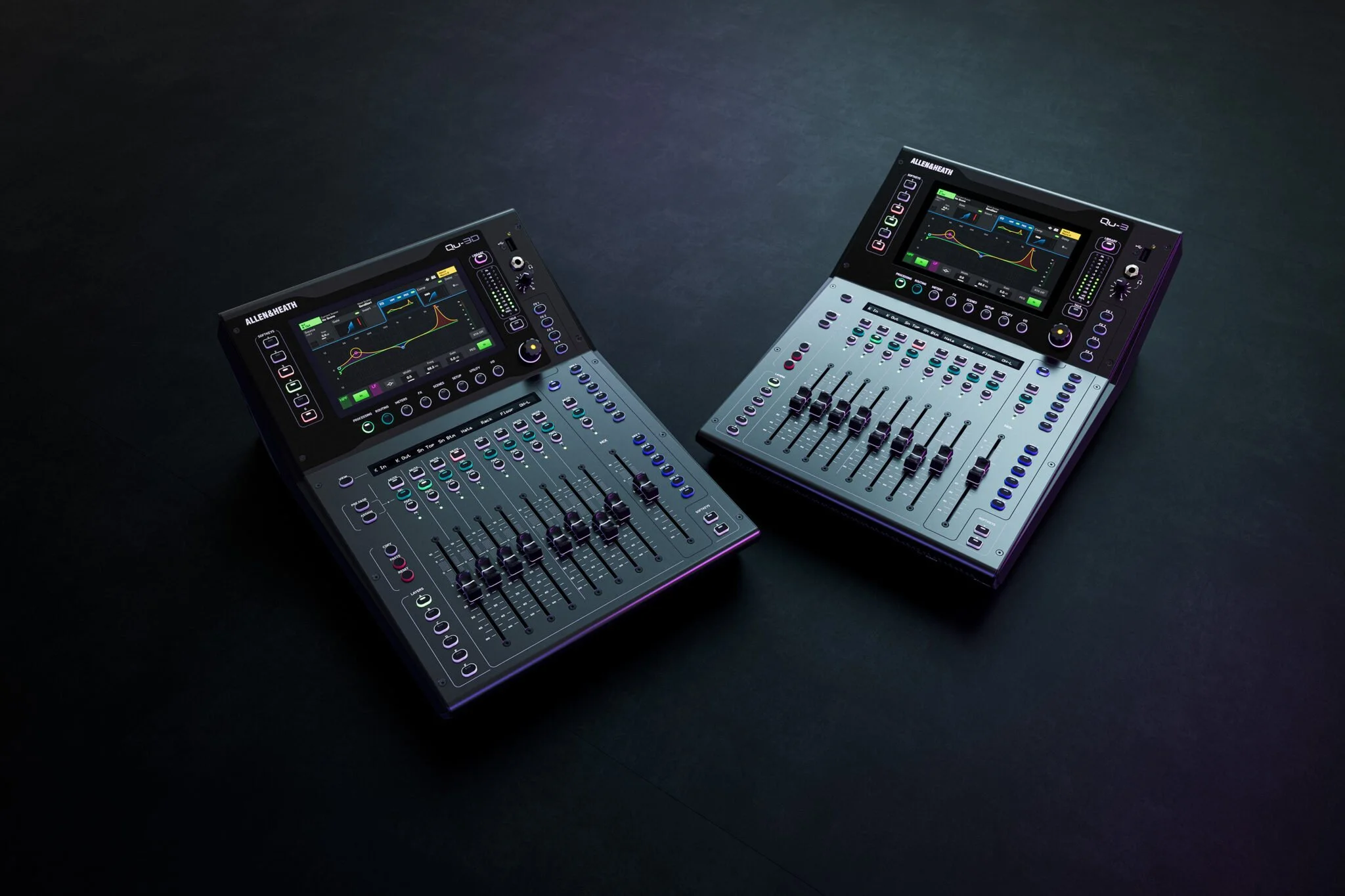
School Paging and Intercom Systems: A Planning Guide for Administrators

A school's paging and intercom system is used hundreds of times a day for bells, morning announcements, and calls to the office. Everyone also depends on it in an emergency. When it works, nobody thinks about it. When a classroom can't hear an announcement or a teacher can't reach the office, it becomes a safety problem and possibly a deadly one.

The traditional school PA was a single-purpose tool. Today's schools need an integrated communication system that handles daily announcements and bell schedules, and can also deliver clear, immediate instructions to every classroom, hallway, gym, and parking lot when it matters most. Two American manufacturers lead the way in building those systems: AtlasIED and Biamp.

What a modern school system should do

  • All-call and zone paging to the whole campus, or to a single classroom, wing, gym, or the schoolyard.

  • Two-way intercom and classroom call-in, with priority for emergency calls to the office.

  • Automated bell and tone scheduling for regular days, late starts, testing and assemblies.

  • Pre-recorded emergency messages for lockdown, shelter-in-place, severe weather, and evacuation, triggered with one button.

  • Visual messaging on displays and flashers for noisy spaces and for students and staff with hearing loss.

  • Integration with fire alarm, access control, security cameras, phones, and mobile notification.

AtlasIED: unified communication and school safety

AtlasIED (Phoenix, Arizona) has built public address and mass notification systems for more than 90 years, and K-12 safety is a core focus. AtlasIED's approach turns the school PA into a life safety communication tool:

  • GLOBALCOM – an enterprise communication ecosystem with controllers, digital communication stations, amplifiers, and interface devices. It combines paging, intercom, bells, and emergency messaging in one system that can scale from a single building to an entire district.

  • IPX Series IP endpoints – network speakers, speakers with visual displays that show scrolling text alerts, administrative control consoles, and IP-to-analog gateways. Gateways let a school connect modern IP paging to existing analog speakers, a cost-effective path when a full replacement isn't in the budget.

  • InformaCast software by Singlewire – mass notification that sends the same alert to speakers, displays, desk phones, computers and mobile devices at once, reaching students, staff and parents wherever they are.

  • Rapid Alert wearable badges – silent panic alerts that staff can trigger from anywhere on campus. Several states now require silent panic alarm systems in public schools that connect to emergency responders, and AtlasIED's platform supports these requirements, including direct integration with RapidSOS for first-responder alerting.

  • IntelliSee – an AI risk-detection platform that works with existing cameras to flag hazards such as weapons, trespassers, and slip-and-fall incidents.

  • 5400 Series Life Safety Public Address – listed life safety PA for applications that require it.

  • Speakers, horns and amplifiers – ceiling speakers, vandal-resistant enclosures, all-weather horns for playgrounds and parking lots, and PoE paging horns.

AtlasIED also offers a free online school safety readiness check and an interactive virtual school tour that shows how its technology covers each space on a campus.

Biamp Vocia: networked paging and evacuation

Biamp (Beaverton, Oregon) is known worldwide for its Tesira audio processing platform, and its Vocia networked paging system is purpose-built for facilities that need both everyday paging and critical emergency messaging in one platform. Biamp's own school paging and evacuation design template shows how a Vocia system provides building-wide evacuation messages, regular paging, and automated school bells, with granular zoning so announcements can go to individual classrooms, the assembly hall, the schoolyard, or the administration office.

Key elements of a Vocia school system:

  • DS-10 and DS-4 desktop paging stations for the front office and security office. The DS-10 supports up to 999 user-configurable page codes, so staff can reach any single room, group of rooms, or the entire campus.

  • EWS-10 emergency wall paging station that allows live paging even while the system is operating in emergency mode.

  • Networked Vocia amplifiers such as the VA-8150CV and VA-4300CV, which power speakers in classrooms, gyms, cafeterias, libraries, halls, and outdoor areas.

  • Live, pre-recorded, scheduled, and VoIP paging, so announcements can come from a paging station, a phone, or an automated schedule.

  • Bell system integration, routing bell tones through the same loudspeakers.

  • Ambient noise compensation that automatically raises paging volume in loud spaces like gyms and cafeterias, and lowers it in quiet ones.

  • Fire alarm interface, including the ability to alert the fire panel when the paging and evacuation system has a fault that needs attention.

For classrooms, auditoriums, and multipurpose rooms, Biamp's Tesira processing and classroom audio solutions add voice lift, presentation audio, and remote monitoring through Biamp Workplace, so the same family of products can serve both campus-wide paging and teaching spaces.

AtlasIED or Biamp: which is right for your school?

Both platforms deliver reliable, professional school communication. The right choice depends on your priorities:

  • Choose AtlasIED when your focus is a complete school safety ecosystem: IP endpoints with visual alerts, mobile and desk-phone notification through InformaCast, wearable panic alerts, and district-wide management.

  • Choose Biamp Vocia when you need precise, room-by-room paging and evacuation messaging with networked amplification, automatic level control, and tight integration with Biamp audio in auditoriums, gyms, and classrooms.

  • Combine them when it makes sense. Many campuses use mass notification software and IP endpoints alongside a networked paging and audio platform.

Coverage and intelligibility

An announcement only counts if students and staff understand it.

  • Gyms, cafeterias and natatoriums: hard surfaces and high ceilings cause echo, so speakers must be chosen and aimed for speech clarity, with ambient noise compensation where possible.

  • Hallways and stairwells: more speakers at lower volume beats a few loud ones.

  • Outdoor areas: playgrounds, athletic fields, parking lots and bus loops need weather-resistant horns.

  • Locker rooms and restrooms: often overlooked, but they need coverage for emergency messages.

  • Noisy spaces and passing periods: pair audio with visual displays so no one misses an alert.

Emergency communication best practices

  • Program one-button messages for each drill and emergency type, so staff don't have to find the right words under stress.

  • Give emergency messages priority over bells, music and routine pages.

  • Make sure classroom emergency call-ins are clearly identified at the office.

  • Coordinate with your fire alarm system. A fire alarm voice evacuation system is a code-listed life safety system, and the paging system must defer to it during an alarm. Local codes and the authority having jurisdiction determine requirements for voice evacuation.

  • Test the system with every drill and document the results.

Planning your project

  1. Survey the existing system: what works, and which wiring and speakers can stay. IP-to-analog gateways and networked amplifiers often let you reuse existing 70-volt speaker lines.

  2. Map zones around how the building is used: classrooms, grade levels, specials, athletics, administration, and outdoor areas.

  3. Define emergency procedures and the messages the system must deliver.

  4. Coordinate with IT on network, PoE, and cybersecurity requirements.

  5. Plan installation around the school calendar. Summer and winter breaks are ideal for cutover.

  6. Train office staff and administrators before the first day of school.

Reliable communication for every classroom

Advanced Sound & Communication has served the Kansas City area since 1998. We design, install and service AtlasIED and Biamp school paging, intercom and emergency communication systems for public and private schools within about 200 miles of Kansas City. We survey your buildings, design coverage for every space, integrate with your existing infrastructure and work around your schedule to keep disruption to a minimum. We also support schools on public bid projects.

Ready to upgrade your school's communication system? Contact Advanced Sound & Communication at advancedsoundkc.com to schedule a site survey.

AC Power Requirements for AV and IT Equipment: What Every Facility Should Plan Before the Gear Arrives

When a church sound system thumps through the speakers on power-up, a classroom display locks up every afternoon, or a restaurant's music system and POS network reboot during a storm, the culprit is usually not the equipment. It's the power feeding it.


Audio, video, lighting, control, and IT gear all share the same need: clean, stable, properly grounded AC power, switched on and off in the right order. Whether you're building a new worship center, upgrading a school auditorium, fitting out an office conference room or wiring a warehouse security head-end, here's what AC power for AV equipment really requires, drawn from the engineering papers published by the companies that build the power gear we install.

Start With Dedicated Circuits

The most important step happens before you order any equipment: give AV and IT racks their own branch circuits. Middle Atlantic's white paper Integrating Electronic Equipment and Power into Rack Enclosures, written with input from grounding experts Bill Whitlock of Jensen Transformers and Neil Muncy, recommends dedicated branch circuits for AV equipment to prevent the pops, clicks, and noise that come from sharing a line with other loads.


SurgeX makes the same recommendation for IT equipment, and its paper on neutral-to-ground voltage explains why. When a long circuit run or a shared neutral carries current from other devices, a few volts can develop between neutral and ground at the outlet. That's enough to make microprocessor-based gear behave erratically or lock up until it's rebooted. Network switches, DSPs, video processors, and control processors are all vulnerable. SurgeX's preferred fix is a dedicated circuit run by a licensed electrician, sometimes with wire one or two sizes heavier than the minimum.


What to share with your electrician or architect: the total equipment load per rack, where racks and amplifiers will sit, and that AV/IT circuits should not be shared with HVAC, kitchen equipment, motors, or general convenience outlets.

Size Circuits for Real Loads, Not Nameplates

Amplifiers, LED video walls, and lighting fixtures don't draw a steady current. Middle Atlantic's paper points out that the National Electrical Code (NEC 210.19) treats any load running three hours or more as continuous, so wiring and breakers are sized at 125% of that load. A worship service, a school day, or a restaurant shift easily qualifies. The paper also notes that amplifier current draw swings widely with program material and speaker impedance, so nameplate ratings are a poor guide.


Power planning should account for:

  • Continuous operation. Size circuits at 125% of the expected load.

  • Amplifier behavior. Use manufacturer current-draw data for real program levels and speaker loads.

  • Headroom. Middle Atlantic advises keeping a single-circuit sequencer at no more than 80% of its rated capacity.

  • Future growth. Spare circuits cost little during construction and a lot afterward.

Sequencing: Turn It On (and Off) in the Right Order

Every audio system has a rule: turn on amplifiers last, and turn them off first. If amplifiers are live when mixers, DSPs, or wireless receivers power up, the turn-on transient goes straight to the loudspeakers as a loud pop that can damage drivers and startle a room.


Sequencing also solves a second problem: inrush current. LynTec, the power-control manufacturer founded in 1982 and long based in Lenexa, Kansas, notes that video walls can draw eight to ten times their normal current at startup. When several amplifiers, LED walls, or lighting circuits switch on at once, that surge can sag voltage, trip breakers, and wear them out early. Staggering each circuit with a short delay spreads the load.


How sequencing is done depends on the size of the system:


  • Rack-level sequencers handle a single rack or room. Juice Goose, founded in 1983 and described as the first company to build power conditioning products specifically for the audio industry, makes sequenced power distribution for small and mid-size systems. Juice Goose is now part of LynTec, and its products carry "Powered by LynTec" branding in the U.S.

  • Panel-level power control handles large worship centers, auditoriums, arenas, and venues. LynTec's relay panels and motorized-breaker panels switch and sequence power at the electrical panel, so you can control entire systems (audio, video, and lighting) from a wall switch, a timer, a lighting console via DMX, or a control system.

Power Down Completely When the Room Is Empty

LynTec makes a point that surprises many facility managers: a typical worship facility's AVL system is used only about 3% to 5% of the week, yet much of that gear sits on standby the rest of the time. Standby still draws power, keeps electronics warm, and leaves equipment exposed to surges. LED fixtures dimmed to zero still have their electronics energized, and LynTec notes that many manufacturers now recommend fully powering fixtures down when idle.


Circuit-level shutoff also gives digital equipment a clean restart. Wireless DMX, video walls and networked audio devices sometimes need to boot within a specific window to find each other, and a sequenced power-up makes that repeatable. Schools, churches, conference centers and venues with scheduled hours can automate all of this with timers or occupancy sensors.

Surge Protection: Where the Energy Goes Matters

Not all surge protection is equal. Most power strips use metal oxide varistors (MOVs) that divert surge energy to the ground wire. SurgeX's white paper on its Advanced Series Mode technology argues that in an AV system, that ground is shared by every signal cable, so diverted energy can spread through audio, video and control connections. SurgeX also notes that MOVs wear out a little with each surge they absorb. (These are manufacturer claims; ask us about the trade-offs for your facility.)


SurgeX, whose AMETEK-owned operation manufactures in Knightdale, North Carolina, takes a series-mode approach that blocks surge energy rather than shunting it to ground. Middle Atlantic's paper recommends a layered approach: a Type 2 surge protective device at the service entrance for surges from outside the building, Type 3 protection at the equipment for transients generated inside, and, where needed, an isolation transformer and noise filtering.


That inside-the-building part matters. A SurgeX paper on IT protection cites industry research finding that about 80% of electrical disturbances originate inside facilities, from HVAC, lighting, motors and overloaded circuits. In warehouses, manufacturing plants, distribution hubs, restaurants and fitness centers, those internal sources are everywhere.

Grounding, Isolated Ground and Balanced Power

Hum and buzz in an audio system or rolling bars on a video feed often trace back to grounding. A few principles from Middle Atlantic's paper:


  • Never lift a safety ground. The paper calls defeating the power cord ground potentially fatal. Signal cable shields are not safety grounds.

  • Isolated ground (IG) circuits use an insulated ground conductor bonded only at the panel, but they are easily compromised by stray connections, including through signal cables.

  • Bond racks properly. Ganged racks should be bonded together with paint-piercing hardware; Middle Atlantic recommends racks with factory ground studs.

  • Check wiring under load. A standard plug-in outlet tester can't detect a neutral-ground reversal or a "bootleg" ground.


For the most noise-sensitive spaces, such as recording studios, broadcast rooms, critical-listening rooms and high-end home theaters, balanced power is another option. Equi=Tech, whose systems are designed and hand-assembled in Grants Pass, Oregon, builds isolation transformers that deliver 120 volts as two 60-volt halves balanced around ground, so noise on the two sides cancels much like a balanced audio cable. In commercial and industrial buildings, NEC Article 647 governs these systems, so they should be designed and installed by qualified professionals. An independent white paper published by SurgeX estimates balanced power typically lowers hum and buzz by roughly 8 to 10 dB, and notes that good isolated-ground design and local bonding can also be very effective.

Backup Power for Networks and Control

As AV systems move onto the network, a brief outage can take down a DSP, a control processor or a video encoder in the middle of a service, a class or a city council meeting, and some devices take minutes to reboot. A UPS keeps critical gear running through short outages and allows a clean shutdown during longer ones. SurgeX's IT paper is careful to note that a UPS isn't a full surge protection strategy on its own.


For racks, Middle Atlantic's NEXSYS Online UPS series uses online double-conversion with zero transfer time and pure sine wave output, comes in 1000VA to 3000VA models, and works with RackLink for remote monitoring. That remote visibility is valuable for police departments, city facilities, health care and multi-site businesses where downtime is costly and nobody is standing next to the rack.

A Quick AC Power Checklist for Your Next Project

  1. Inventory the load. List every rack, amplifier, display, LED wall, lighting circuit and network device, with real current draw.

  2. Plan dedicated circuits. Separate AV/IT power from HVAC, motors, kitchen and convenience loads, sized for continuous use.

  3. Decide on grounding. Standard, isolated ground, or a technical power system with an isolation transformer.

  4. Sequence everything. Amplifiers on last and off first; stagger high-inrush loads.

  5. Layer surge protection. Service entrance plus point-of-use protection.

  6. Add backup power for network, control and recording gear.

  7. Automate shutdown with timers, occupancy sensors or control-system integration.

  8. Document and label every circuit, breaker and outlet.

Why Work With Advanced Sound & Communication

Since 1998, Advanced Sound & Communication has designed, installed, and serviced audio, video, lighting, security, and control systems for houses of worship, schools, colleges, civic facilities, restaurants, performing arts centers, and businesses across the Kansas City area. We work alongside your electrician and architect early, so power requirements are on the drawings before the walls close. Our in-house analog and digital technicians troubleshoot hum, lockups, and power-related failures, and our team is full-time, background-checked, insured, and bondable, with no volunteer, student, or subcontracted labor. We're an authorized dealer for everything we sell, including power products from LynTec, Juice Goose, Middle Atlantic, SurgeX and Equi=Tech.

Let's Plan Your Power the Right Way

Planning a new build, a renovation, or an upgrade, or chasing a hum or reboot problem you can't pin down? Call Advanced Sound & Communication at 816.931.9525, email info@advancedsoundkc.com, or use our contact form. Send us your equipment list and electrical drawings, and we'll help you plan circuits, sequencing, and protection. You can also learn more about our design, installation, and service work.


Choosing a Digital Mixing Console for Your Church

The mixing console is the heart of your church's sound system. Every voice, instrument, music, and video playback passes through it before reaching the congregation, recording, livestream, and the musicians' monitors. Changing your mixing console is one of the most impactful upgrades a church can make. The best console for your church isn't the one with the longest feature list. It's the one that fits your services, your room, and, above all, your volunteers.

Why churches move to digital

Many assume sound systems must be digital to sound good. This is not so. Good analog mixers can outperform digital consoles. Even very inexpensive analog mixers offer more gain, hotter outputs, and wider bandwidth than digital. The internet is full of bad information. Dave Rat has an excellent YouTube video where he puts a $49 analog mixer on the test bench against a Behringer X32 and Midas M32, and the $49 analog mixer outperforms the digital mixers, hands down. The analog mixer delivers louder, punchier mixes and a wider frequency response.

Marketing tells churches to use an X32, and churches will get what the “big guys” have in form and function. While that is true, simply having it doesn’t bring the same results. We hear, “We got an X32 mixer because the sound man at pastor so and So's church uses it, and we wanted to sound like them.” Those people get frustrated because they don’t have the same results. Well no. They aren’t in the same room, with the same people, playing and singing the same arrangements, etc.

“We got a digital mixer because we thought we could store presets and make every service sound the same.” That’s a HUGE misconception. Scenes, presets, and libraries are excellent tools for resetting the system, configuring it for the service, and providing a good starting point. Scenes and presets are NOT a replacement for a properly trained and skilled operator. For Scenes and presets to replace an operator, no humans would be performing music in the room. This would only work for pre-recorded material. Everyone would have to sing, play, and have their instruments and amplifiers tweaked exactly the same way, every time, in a room with the same crowd noise, ambient noise, temperature, and humidity… every time. That is just impossible.

The reasons to choose a digital mixing system are too many to list here, but we will cover some of the biggest benefits.

  • Consistency every week. Scenes and snapshots recall every setting and eliminate the shock of walking in to find your rehearsal settings changed.

  • Configurability. User requirements and skill sets vary. Custom layers and controls let users access only what they need, and nothing more. This benefits those who rent their spaces to outside users.

  • Built-in processing. EQ, compression, gates, effects, and pitch correction are integrated, replacing racks of outboard gear, computers, and apps.

  • Smaller footprint. Portable digital stage boxes, stage floor pockets and wall-mount patch panels can be connected with a single Ethernet cable, replacing large, expensive infrastructure.

  • Remote mixing. Tablets with apps let the engineer walk the room and hear what the musicians on stage and the congregation hear. You can mix livestream audio in other quiet rooms to maximize audio quality.

  • Easy recording. Multitrack recording over USB or the network makes "virtual soundcheck" practice possible for volunteers.

Count your inputs and outputs

Start with your biggest service of the year, not an average Sunday:

  • Inputs: every vocal mic, instrument, drum mic, wireless channel, playback computer and video source. Add 20 to 25 percent for growth.

  • Outputs: main speakers, subwoofers, front fills, lobby and overflow rooms, livestream feed, recording, and every monitor mix.

Most churches with a full band land between 24 and 48 inputs. Remember that the mixer channel count, not the stage boxes, determines how many mics you can plug in. Just because you can connect 96 inputs to the console doesn’t mean you can mix 96 inputs. It’s merely a mechanism for allowing multiple stage sets to remain patched for maximum speed and accuracy when changing from one service to another.

Plan your mixes: house, stream and monitors

A modern church console often runs three to four different mixes at once:

  1. The house mix for the people in the room.

  2. The livestream mix, which needs a different balance because the room isn't adding drums and acoustic sound for online viewers. A dedicated stream mix, or a second console for broadcast, makes online worship sound dramatically better.

  3. Monitor mixes for the musicians, singers, and pastors.

  4. Campus mixes for overflow rooms, halls, nursery, and exterior speakers.

Personal monitoring systems let each musician adjust their own in-ear mix, taking pressure off the front-of-house engineer. Digital Audio Labs' Livemix system, made by a Minnesota-based American company, is a favorite with worship teams. This system is mixing system agnostic. You can replace the mixing system anytime without changing the monitor system. “This is the way.”

Make it volunteer-friendly

If you have an older congregation and your volunteers would prefer not to learn something new, and are more comfortable with your analog workflow, stick with it. If your analog mixer is young and healthy enough, you can add digital signal-processing tools to supplement your analog workflow and give you the tools and convenience of digital mixers.

Most churches rely on volunteers who mix one or two Sundays a month. The right console helps them succeed:

  • Clear layout with labeled, color-coded channels and simple custom layers that show only what each service needs.

  • User permissions that lock advanced settings while leaving faders and mutes available.

  • Well-built scenes for each type of service: worship band, acoustic set, youth night, funeral, wedding.

  • Training and documentation from your installer. A one-page "Sunday startup" checklist at the console is worth more than any feature.

Connecting stage boxes: proprietary links vs. open standards

The stage box puts microphone inputs and outputs on the platform and sends everything to the console over a single network or fiber cable. The protocol that carries that audio matters more than most churches realize. It determines which stage boxes you can buy, what other equipment can share audio with the console, and whether your investment will survive the next console upgrade.

Closed, manufacturer-specific protocols. Many console families connect to their own stage boxes over a proprietary link. Examples include Allen & Heath's SLink, gigaACE and DX connections, Yamaha's TWINLANe on RIVAGE PM systems, and the AVB-based stage racks used with Avid's VENUE S6L. These links are fast, low-latency and largely plug-and-play. The trade-off is lock-in: you can generally use only that manufacturer's stage boxes, sharing audio with other brands requires an extra bridge card, and if you change console brands in ten years, the stage boxes often have to be replaced too.

Dante: the industry's most widely adopted network. Dante, developed by Audinate, is a licensed technology rather than a public standard, but it has been adopted by hundreds of manufacturers. Consoles, stage boxes, wireless microphone receivers, amplifiers, DSP processors, recording computers and broadcast rooms can all share audio over standard managed network switches. For most churches, Dante is the safest choice for connecting equipment from different brands, and many consoles offer it built in or through an option card.

Questions to ask before you buy:

  1. Which stage boxes will this console work with, and are they all from one manufacturer?

  2. Can the console send and receive Dante or AES67 natively, or does it need an option card?

  3. Will it run on standard managed network switches that your integrator and IT team can support?

  4. If you replace the console in the future, can you keep your stage boxes and network?

A proprietary stage box link isn't a deal-breaker, but your system should speak at least one open or widely adopted protocol so it can grow with your ministry. The entry-level Behringer X32, Midas M32, and Wing consoles use their proprietary AES50/SuperMac and StageConnect adaptations. You must buy a Dante card to connect to Dante devices, but they DO NOT natively control third-party, industry-standard Dante-enabled head-amps. You can’t mix a Yamaha or Allen & Heath Dante stage box with a Behringer X, Wing or Midas M mixer.

Tactile control surface vs. iPad, tablet or touchscreen

Most modern mixers can run entirely from an iPad, tablet, or touchscreen computer, and rack-mount mixers like the Violet Audio dMix 128 and mix engines like the Allen & Heath dLive range are controlled this way and cost less than a full console. Tablets are powerful tools, but for a main sanctuary with a live band, a dedicated physical control surface still has clear advantages.

Why a tactile surface wins during the service:

  • Eyes on the stage, not the screen. Physical faders and knobs build muscle memory, so the operator can make changes by feel while watching the pastor and worship leader.

  • Many moves at once. Two hands can ride several faders at once, such as bringing up the pastor's headset while pulling the band down during a transition. Touchscreens reliably handle only a touch or two.

  • Instant visual feedback. Motorized fader positions and lit mute buttons show the whole mix’s state at a glance, even after a scene change.

  • Precision. A long-throw fader lets you make smaller, smoother adjustments than a finger on glass.

  • Reliability. A surface doesn't depend on Wi-Fi in a crowded sanctuary, tablet batteries, sleeping screens, pop-up notifications or surprise software updates.

  • Volunteer confidence. New volunteers learn faster on physical controls, and the board is less intimidating than a stack of on-screen menus.

Where tablets and touchscreens shine:

  • Walking the room to adjust EQ, ring out monitors, and hear what the congregation hears.

  • Setting monitor mixes from the stage during rehearsal.

  • Smaller rooms such as chapels, youth rooms and fellowship halls, where a simple mix doesn't justify a full console.

  • Backup and remote access, so a technical director can check or rescue the mix from anywhere in the building.

  • Large touchscreen computers at the front of house give a big overview of routing, metering, and processing alongside a surface.

The best of both: Most churches are best served by a physical front-of-house surface for services, with tablets as a companion for setup, rehearsal, and walking the room. Rack-mount mixers controlled from browsers and tablets are a great fit for secondary rooms, broadcast mixes, and budgets where a surface isn't needed.

Consoles we recommend

Advanced Sound & Communication installs premium consoles from established manufacturers, including American brands where they fit:

  • Yamaha – A long-time standard in worship, with a range that scales from the compact DM3 and the DM7 to the CL and QL series and the flagship RIVAGE PM. Yamaha's Rio stage boxes and CL/QL consoles support Dante natively, so wireless receivers and recording and broadcast systems from other brands connect easily.

  • Violet Audio dMix128 – A new 4U rack-mount mixer with 128 channels of processing at up to 96 kHz, 32 analog inputs and 24 analog outputs, and redundant power supplies. It is built around open networking: AES67 is standard, along with SMPTE ST 2110-30, NMOS, MADI, and AES3, with Dante available through an option card. Control comes from browser-based software on any computer or tablet, and it integrates with Q-SYS and Crestron control systems. At a list price of about $5,995, it's a strong value for multipurpose rooms, broadcast and livestream mixing, or churches that want open-standard networking.

  • PreSonus StudioLive (PreSonus, Baton Rouge, Louisiana) – An approachable, volunteer-friendly console line with strong built-in recording for mid-size churches.

  • Avid VENUE S6L (Avid, an American company) – A flagship console for larger churches with full production teams.

  • Allen & Heath – The SQ, Avantis and dLive families are among the most popular consoles in worship, scaling from small sanctuaries to large multi-site campuses. They use Allen & Heath's own stage box links, with Dante available by option card.

  • DiGiCo – Premium touring-grade consoles for large churches with demanding productions.

Each line suits a different ministry size and style. The right choice depends on your input count, team skill level, livestream plans, and budget.

Get the right console the first time

Advanced Sound & Communication helps churches across the Kansas City area choose, install, and configure digital mixing consoles. We design the full signal path from stage box to speakers, build your scenes and layers, set up livestream and monitor mixes, and train your volunteers so they feel confident on Sunday morning.

Ready to upgrade your church's soundboard? Contact Advanced Sound & Communication at advancedsoundkc.com to schedule a console consultation.

AV System Upgrade: Corroded Connectors, Aging Cable, and Future-Proofing

Most audio and video systems don't fail all at once. They fail over time. People often mistakenly blame failures on equipment and operators. If your system's wiring went in ten, fifteen, or twenty years ago, those small annoyances are often the first signs it's time to plan an AV system upgrade, starting with the infrastructure behind the walls, above the ceiling, and under the floor, not just under the desk, on the stage or studio.

Cable Doesn't Last Forever

Copper cable isn't the best conductor, but it is inexpensive and takes a beating. That’s why it is used in just about every industry. Cables and connectors oxidize when exposed to oxygen. Copper cables, especially those made from “cheap” materials, have memory. The cable has a way it likes to roll and lay when unrolled. Cables and connectors that haven’t moved in years can make noise when you move them or re-patch them. When shielding or ground connections break, you can hear hum and RF (radio).

Audio isn’t the only thing affected. Video can jitter, lose sync, and show color issues when cables are damaged. Depending on the cable type, you can lose the video picture completely, just like data when connections break between computers, switches, and routers.

Patch cables, portable cables, and snakes get stepped on, rolled over by carts, and flexed repeatedly at the same spot near the connector. Over time, fine strands break inside the jacket, shields fray, and crimp and solder joints break. Installed cable ages too: jackets get brittle near heat sources, floor pockets collect dust and moisture, and terminations loosen after years of plugging and unplugging.

The result is rarely a clean failure. It's intermittent noise, a blank screen, a channel that's lower in level or noisier than others, or a problem that only shows up when the building is cold- the kind of issue that only pops up seconds before your event begins.

Connector Corrosion: Why Plating Matters

XLR and other audio connectors usually have contacts plated in either gold or nickel (the shiny "silver" finish). Audio engineer Dave Rat digs into this in his YouTube video "Gold vs Silver (Nickel) Audio/XLR Connectors – Which is Better?", including how connectors hold up against corrosion. It's worth watching for anyone responsible for infrastructure.

  • Plating wears. Plating is a thin layer, and each mating cycle wears a little away. In high-use spots like stage boxes, wall plates, and patch points, it can wear through to the base metal underneath, which oxidizes much more readily.

  • Oxidation raises resistance. As contact surfaces oxidize, connections get less reliable. For low-level microphone signals and phantom power, that means crackles, pops, and dropouts.

  • Mismatched metals are a risk. Connector manufacturer Samtec advises choosing mating connectors with similar plating in the contact areas because dissimilar metals can cause galvanic corrosion when moisture is present. In many older systems, people plugged gold-pin cables into nickel-finished jacks (and vice versa) as gear was added piecemeal over the years.

Not every old connector is bad. But a system built up over decades, with mixed brands, adapters, and plating types, deserves inspection and cleaning, and the worst offenders deserve replacement, not another squirt of contact cleaner.

Signs Your Infrastructure Needs Attention

  • Noise or dropouts when a cable or wall plate is touched

  • Hum or buzz that comes and goes, especially between rooms or buildings

  • Green or dark discoloration on connector pins

  • Feeds that only work "if you plug it in just right"

  • Video sparkles, flicker, or signal loss on long SDI or HDMI runs

  • Missing labels and documentation, so no one knows where a cable goes

  • Computer network connection issues

  • Data loss

  • BYOD (Bring Your Own Device) conference systems won’t charge your devices

  • Multiple format converters are being used to make connections, and touching them causes issues

Rebuild With Quality Connectors and CABLES

Replacing infrastructure is the time to standardize. Using one family of connectors and matching the plating to the components’ connectors throughout removes the mismatched-metal problem and makes future service far simpler.

Connectors

Advanced Sound & Communication uses connectors from the largest de facto standard manufacturers.

  • Switchcraft, based in Chicago, has built American-made connectors, patchbays and cable assemblies since 1946.

  • Neutrik, founded in Liechtenstein in 1975 with U.S. operations in Charlotte, North Carolina, makes XLR cable and chassis connectors that are fixtures in professional audio, video, and data.

  • NSI Industries, based in Huntersville, NC, making connectors and tools for the data and electrical industries since 1975.

Bulk cable

What's inside the wall matters as much as what's on the end. We install cable from manufacturers we trust:

  • Belden, headquartered in St. Louis and founded in 1902, offers broadcast video coax rated for 12G-SDI and a broad line of fiber optic cable.

  • West Penn Wire, part of the Belden group since its founding in 1971, is a leading U.S. manufacturer of fiber optic and low-voltage cable, including digital and analog pro video cable.

  • ICE Cable Systems, headquartered in Austin, Texas, supplies AV and low-voltage bulk cable for professional installers.

  • Windy City Wire of Bolingbrook, Illinois, makes American-made SmartWire cable with footage markers that make clean, accurate pulls easier.

Planning an AV System Upgrade: Why Fiber for Audio, Video and data

Video is where aging copper hits a wall fastest. Each jump from SD to HD to 4K demands more bandwidth, and copper coax and HDMI have practical distance limits that shrink as formats grow. Many facilities that ran coax for standard-definition cameras now find those runs can't reliably carry today's signals from camera positions to the production booth.

Optical fiber solves several problems at once:

  • Distance. Fiber covers runs that copper can't, from across a sanctuary to across a campus.

  • No ground loops or interference. Fiber carries light through glass, not electricity, so it avoids hum from ground differences between buildings and interference from dimmers or power cabling.

  • Headroom for the future. Fiber can stay in place while you upgrade the equipment at each end as formats evolve.

The right converter depends on the signal:

  • AVPro Edge makes HDMI-over-fiber extenders such as the AC-EXO-X-KIT, an 8K-capable HDMI 2.1 extender that reaches up to 300 meters over OM4 multimode fiber, which is ideal for projectors, LED walls and confidence monitors.

  • Theatrixx builds its xVision converter series for live production, including 12G-SDI-to-fiber, fiber-to-12G-SDI and HDMI-to-fiber conversion, plus optical breakouts for multi-channel runs.

  • Blackmagic Design offers the Mini Converter Optical Fiber 12G, a bidirectional SDI-to-fiber converter that uses standard SFP modules.

  • Neutrik opticalCON provides rugged, dust-protected fiber connectors for portable and stage-side runs, where standard fiber connectors would be too fragile.

When we design a fiber backbone, we recommend pulling spare strands. The added material cost is small compared to opening ceilings and walls a second time, and it leaves room for more data drops, cameras, displays, or Life Safety Systems later.

A Smart Way to Replace Old Infrastructure

  1. Audit. We inspect and test cable, connectors, wall plates, and patch points, and document what's actually there.

  2. Prioritize. Fix the failures that affect services and events first.

  3. Design for the next decade. Fiber for video, consistent connectors for audio, room to grow, and clear labeling.

  4. Install and document. Clean terminations, labeled cables, and as-built drawings.

  5. Train and support. Your team learns the system, and we stay available for service.

Upgrades can be phased; for example, run the fiber backbone during a slow season and replace the switches, converters, and extenders later.

Why Work With Advanced Sound & Communication

Since 1998, Advanced Sound & Communication has designed, installed, and serviced systems for houses of worship, schools, colleges, civic facilities, and performing arts spaces across the Kansas City metro. Our in-house analog and digital technicians troubleshoot intermittent problems caused by aging infrastructure, and our certified, OSHA-trained riggers handle overhead work safely. Our team is made up of full-time, background-checked, insured, and bondable employees with an average tenure of about ten years, with no volunteer, student, or subcontracted labor. We're an authorized dealer in good standing for everything we sell, and our mobile repair shop and tool truck reach you from Lee's Summit to Olathe.

Clean work matters behind the walls as much as on the stage. Chuck Walthall of Walthall & Associates / Builders For Christ noted our clean installation and attention to detail, exactly what you want in infrastructure you'll rely on for years. David Walters of Walters Design Group says he doesn’t have to worry when we are on the job, because we pay attention to every detail and own it.

Let's Take a Look at Your System

If your system crackles, hums, or drops out, or you're planning cameras, displays, or a livestream your wiring can't support, we can help you build a plan. Call Advanced Sound & Communication at 816.931.9525, email info@advancedsoundkc.com, or use our contact form. Send photos of your racks, wall plates, and connectors, plus any building plans, and we'll set up a consultation. You can also learn more about our design, installation, and service work.


QSC CX Amplifiers & KW181 Subwoofer: End-of-Life Notice for Owners

Oct 14, 2026 ·

Your QSC CX amplifiers and KW181 subs are on borrowed time

If your church, school, or business has a rack of QSC CX amplifiers or a QSC KW181 subwoofer, this one is for you. QSC has discontinued both product lines, and the factory's ability to repair them is ending. These have been workhorses for years. Many are still running fine today. But when one finally fails, the repair you're used to may no longer be available, and the options left aren't great.

Which models are affected

Check the model number on the front or back panel of your gear, and note whether you have a CX4, CX4T, CX6, CX6T, CX12, or CX12T. QSC no longer repairs these. There is limited service for CX302, CX502, CX702, CX902, CX1102, CX302V, CX602V, CX1202V, CX204V, CX254, CX404, CX168, CX108V. KW181s will have limited service. "Limited service" means repairs are best-effort and depend on available replacement parts. Once those parts run out, the factory can’t fix the unit. QSC also does not service any product 25 years or older.

Sources: QSC discontinued amplifiers · QSC discontinued loudspeakers · QSC end-of-life service list

When one fails, you have two choices

With factory repair off the table, a failed CX amplifier or KW181 leaves you with two real options.

1. Buy a used unit. It looks cheaper up front, but it's a gamble:

  • You don't know how hard it was run, how hot it got, or whether it was dropped.

  • Fans, capacitors, and power supplies wear out with age, and a used unit is just as old as the one that died.

  • There's no warranty, and when the replacement fails, it can't be repaired either.

  • You may end up paying twice: once for the used unit, and again for a modern replacement a year later.

2. Replace it with a modern equivalent. This is the option we recommend. Current amplifiers and active subwoofers come with a full manufacturer warranty and factory support for years to come. Many also add features the old gear never had, such as built-in DSP, network monitoring, lower power draw, and lighter weight.

Replacing CX amplifiers: Crown, LEA, Powersoft, and QSC

Advanced Sound KC can recommend a current amplifier from four premium brands that fits your existing speakers and rack:

  • Crown: a long-standing American amplifier name trusted in churches, schools, and commercial installs.

  • LEA Professional: an American company building network-connected installation amplifiers with remote monitoring built in.

  • Powersoft: high-efficiency amplifiers known for packing a lot of power into very little rack space.

  • QSC: if you'd like to stay with the brand you know, QSC's current amplifier lines are a natural fit.

The right match depends on how your system is wired. We'll look at whether your speakers run on 70V/100V distributed lines or low-impedance outputs, how many channels you need, and how much power each zone requires.

Replacing the KW181: JBL, QSC, and RCF

The KW181 was a popular 18-inch powered subwoofer for worship teams, school gyms, and portable PA rigs. Today's active subwoofers match or beat it on output, and many are lighter and easier to move.

We can recommend a comparable active subwoofer from:

  • JBL: an American pro audio brand with powered subwoofers for both portable and installed systems.

  • QSC: QSC's current KS Series includes the KS118, a powered 18-inch subwoofer in the same class as the KW181.

  • RCF: active subwoofers with strong low-end output and solid build quality.

We'll help you pick one that matches your existing tops and the size of your room.

Plan now, not on Sunday morning

Amplifiers and subwoofers rarely fail at a convenient time. It's usually right before a service, a graduation, or a big event. Planning your replacement now means you choose the gear and the timing, instead of scrambling for whatever used unit you can find.

Contact Advanced Sound KC. Send us the model numbers of your QSC CX amplifiers or KW181 subwoofers, and we'll recommend modern replacements from Crown, LEA, Powersoft, QSC, JBL, or RCF that fit your system and budget. We design, sell, and service audio, video, lighting, and security systems for churches, businesses, schools, and homes across the Kansas City area.

Reach us at advancedsoundkc.com to get started.

Better Livestreams: What Viewers Want

How to Make Your Church Livestream, Webinar or Training Video Something People Actually Want to Watch

Your online audience will forgive average video. They won't forgive bad sound. Whether you stream Sunday worship, host a sales webinar, or record training videos for staff and students, viewers at home decide in the first minute. If they can't hear clearly, they leave, and many don't come back. The good news: the fixes are well understood, and most of them start with audio. Here's what viewers love, what drives them away, and the tools we recommend to get it right.

What online viewers dislike most

Sound that comes and goes. This is the number one complaint, by far. Viewers describe volume swinging up and down, voices disappearing when the pastor steps away from the pulpit, and music that drowns out speech. The usual cause: the stream is fed the same mix as the room. A mix built for a large, echoey sanctuary sounds thin and uneven in earbuds.

Dropouts and buffering. Freezes, stalls and audio cutting out mid-sentence break the moment. In a worship service or a live training, that's hard to recover from.

Hassle just getting in. In one industry survey of training webinars, 53% of attendees named registration and 50% named login as their biggest frustrations (Kaltura). Forced app downloads and long sign-up forms cost you viewers before you start.

Video that's hard to see. One wide shot of a dark stage, a presenter lit from behind by a projection screen, or slides too small to read on a phone.

Dead air and feeling ignored. A black screen before start time, audio out of sync with lips, and a service or session that never acknowledges the people watching online.

What viewers love

Clear, present voices. When every word is easy to understand, people stay. Many will even listen like a podcast while they drive or do chores.

The feel of the room. For worship, hearing the congregation sing makes home viewers feel like part of the service, not an audience watching through a window.

Convenience. Watch live or later, on a phone, laptop or TV, without creating an account.

Connection. For many churchgoers, the stream is a lifeline. A 2026 study of 607 viewers of Munich Cathedral's livestream found most were already connected to the church and often unable to attend in person, and that technical quality shaped how they experienced the service (ZPTh). Think homebound members, travelers, and parents with a sick child.

For training and how-to videos: close-ups of hands and equipment, readable on-screen text, chapters to jump around, and handouts to download.

Seven ways to give online viewers a better experience

  1. Build a dedicated stream mix. Send a separate output from your mixing console to the stream, with more vocal presence, steady compression and less low end. This single change fixes most "I couldn't hear" complaints.

  2. Add ambient microphones. A pair of quality room mics captures congregational singing and audience reaction, so the stream doesn't sound empty.

  3. Put the right mic on every presenter. Headset or lavalier wireless mics keep voices consistent when speakers move around the stage or classroom.

  4. Light faces, not just the stage. Front lighting from about 45 degrees, and no bright screens directly behind the speaker. Good lighting improves video more than a new camera does.

  5. Use two or three cameras. A wide shot, a speaker close-up, and for training, an overhead or detail shot. Preset PTZ cameras let one volunteer run a polished show.

  6. Make reliability routine. Hardwired internet, a dedicated upload connection, and a weekly pre-stream check where someone watches the actual stream on a phone, since that's how most people watch.

  7. Remove friction and welcome people. One simple link, no login for public services, a countdown slide instead of a black screen, captions, and someone who greets the online audience by name.

Start with a stream audio tune-up

Many churches, schools, and businesses already own decent cameras but still send the room mix to their stream. Our stream audio tune-up fixes the problem viewers notice most:

  • A review of your current stream, watched the way your viewers watch it

  • A dedicated stream mix set up on your console

  • Ambient and presenter mic recommendations

  • Simple lighting improvements for on-camera faces

Advanced Sound KC designs, installs, and supports audio, video, lighting, and security systems for churches, businesses, schools, and homes across the Kansas City area. Contact us to schedule a consultation and give your online audience the experience they deserve.

Church Sound System Installation in Kansas City: What to Expect From Design to Training

If your congregation is planning a church sound system installation, you probably have a list of frustrations already: people in the back say they can't hear well, the music is too loud, musicians can’t hear everything, feedback that shows up at the worst moment, or the person who knew how to run everything left and few people are good with technology.  Most of those problems are solved before you order any equipment. Here is what the process looks like when it's done well, from the first walk-through to the Sunday your team runs the new system on its own.

Advanced Sound & Communication has designed, installed and supported worship arts audio, video, lighting and control systems across the Kansas City metro since 1998, from Overland Park and Olathe to Lee's Summit and Independence. Worship arts systems are at the core of what we do, so we know the process well.


Step 1: The Site Visit and Needs Assessment

A good installation starts with listening and learning, not a parts list. During the first visit, an experienced designer will look at and ask about:

  • The room itself. Ceiling height, wall and floor finishes, windows, balconies and the overall shape all decide how sound behaves. A hard-surfaced sanctuary with a high ceiling needs a very different approach than a carpeted, low-ceiling fellowship hall.

  • How you worship. A spoken liturgy with organ and choir has different needs than a full band with in-ear monitors.

  • Who runs the system. Is it a paid technical director, a rotating group of volunteers, or the pastor pressing one button? The answer shapes how simple the controls need to be.

  • What else is connected. Livestream and recording feeds, assisted listening, exterior, overflow rooms, lobby, nursery and children's wing often all need audio.

  • Your timeline and budget. A clear plan can be phased over several budget cycles without wasting money on equipment you'll replace later.

Step 2: Designing a Church Sound System Installation That Fits Your Room

Design is where professional help makes the biggest difference. The goal for most sanctuaries is simple to state: every seat should hear the spoken word clearly and the music evenly, without sound bouncing off the walls and ceiling and smearing the sound. Getting there means choosing acoustic treatment, electronics and loudspeakers to focus sound where people sit, and keep the system stable and easy to run.

Loudspeakers that control where the sound goes

In many churches the loudspeakers matter more than any other single choice, because they set how much sound lands on the congregation and how much sprays onto reflective surfaces. Three of the many manufacturers ASC offers are known for exactly this kind of pattern control:

  • Danley Sound Labs (Gainesville, Georgia). Danley's Cohearix and Synergy Horn technology combine several drivers covering different frequency ranges into a single horn, so they behave like one full-range source with consistent response across the whole coverage area. The company's stated goal is to keep sound energy in the audience's seats rather than on side walls, ceilings, and floors, which is exactly what a reflective sanctuary needs. Danley's very first product was designed with 300-seat churches in mind, and houses of worship remain a big part of its customer base.

  • Fulcrum Acoustic (designed and built in Whitinsville, Massachusetts). Fulcrum is known for coaxial loudspeakers that deliver consistent sound to the sides of the speaker, paired with processing technologies such as Temporal Equalization (TQ) and Passive Cardioid Technology. In practice, this helps clean up a loudspeaker's response and reduce unwanted sound behind or beside it, which is useful for keeping energy off the platform and out of open microphones.

  • Eastern Acoustics Works (Franklin, Massachusetts).  We use ADAPTive Performance technology because it is an intelligent system that uses high driver density and individual amplification/processing per transducer to digitally steer and shape sound coverage via Resolution 2 software.

A proper design uses your room's dimensions and manufacturer data to predict coverage before anything is hung.  We use software to create acoustic models of rooms.  We listen to the rooms virtually to verify acoustic treatment and speaker systems are correct and in their ideal locations.

Processing and control your volunteers can actually use

Behind the loudspeakers sits digital signal processing (DSP), which handles the tuning, protection, routing and room presets. One platform ASC offers is Symetrix, an American company founded in Seattle in 1976 and headquartered in Mukilteo, Washington. Symetrix processors support the Dante audio network, which makes it easier to send audio to a livestream room, overflow space or lobby over standard network cabling. Just as important for churches, Symetrix offers simple end-user controls: Wall panels for things like volume, source selection and presets, and ARC-WEB, which lets authorized staff adjust the system from a phone, tablet or computer browser. A pastor can turn up in the lobby or recall a "Wednesday night" preset without touching the main console.

Step 3: Installation

Installation is where good designs succeed or fail. Loudspeakers often hang high above seating, so rigging must be planned and done correctly. Cables need to be routed, labeled and documented so the next person who opens a rack can understand it. And the work should be done with respect for a building that is used every week.

At ASC, installs are performed by our own team of background-checked, insured and bondable employees, trained and certified, with an average of 20 years in the industry. We don't use volunteer, student or subcontracted labor, so the people who designed your system are the people who build it. Chuck Walthall of Walthall & Associates / Builders For Christ has noted how clean our installations are and the attention to detail our crew brings.

Step 4: Tuning and Commissioning

Once everything is hung and wired, the system has to be tuned to the room. This includes time-aligning loudspeakers so they arrive together, setting equalization, balancing the levels between main and fill speakers, and setting limits that protect the equipment. Then it should be tested the way it will be used: spoken word, a full band and the livestream feed.

Step 5: Training Your Team

A new system is only as good as the people running it on Sunday. Training should be hands-on, at your church, on your equipment, and aimed at your actual team, whether that is one technical director or a rotation of volunteers. Good training covers the everyday basics (powering up, recalling presets, ringing out a microphone, mixing a typical service) along with what to do when something doesn't sound right.

In her testimonial, Carol Ann Petersen of Sophia Spirituality Center said her system works as promised and that the training was excellent.

After the Install: Ongoing Service and Support

Churches grow, worship styles change and equipment ages. Choosing an installer you can call years later matters as much as the installation itself. ASC keeps in-house analog and digital technicians and a mobile repair shop and tool truck, so service calls don't have to wait on a third party. We're also an authorized dealer in good standing for everything we sell, which keeps warranty work simple.

Some relationships last decades. John Hollan of Blue Valley Baptist Church describes a partnership that began with rentals and grew into large design and installation projects on two campuses, and he points to our creative, long-term thinking and strong service. The City of Grandview's Kraig Briggs has been a customer for roughly 23 years.

Questions to Ask Any Church Sound System Installer

Whoever you talk to, these questions will help you compare proposals fairly:

  • Who will actually do the installation, and are they employees or subcontractors?

  • Will you predict coverage for our room before we buy, and show us the results?

  • Who handles rigging, and what are their qualifications?

  • How will the system be tuned, and will we receive documentation and drawings?

  • What training is included, and can you train more than one volunteer?

  • Who do we call when something goes wrong, and how quickly can a technician come out?

Start Planning Your Church's Sound System

Whether you're replacing a tired system in an older sanctuary or planning audio for a new building, Advanced Sound & Communication can help you plan it the right way from the start. Send us photos of your worship space and any floor plans or drawings you have, and we'll set up a consultation.

Call 816.931.9525, email info@advancedsoundkc.com, or use our contact form. You can also browse our recent projects or learn more about our design, installation and service work. We're located at 3817 Broadway St., Kansas City, MO 64111.


3 Common Issues with Commercial Sound Systems

3 Common Issues with Commercial Sound Systems

Audio systems are integral to nearly every kind of business. Doctors' offices comfort patients with gentle music in waiting rooms. Restaurants and hotel lobbies set the mood with upbeat playlists, while churches share music and sermons to foyers, lobbies, and classrooms over the ceiling audio system. 

As essential as commercial sound systems are, they can also cause many issues for businesses. Whether audio is too quiet in a church, too loud in a restaurant, or causes echo in the conference room, it’s a common point of frustration for most organizations. 

No matter what type of business you manage, it’s understandable to run into some audio issues. And you’ve probably discovered these problems after your business has already been running for a while—and it may be too late for a huge renovation. 

Well, no fear here! Read on to learn how we can solve common issues with commercial sound systems in your Tulsa, OK, business. 

Rube Goldberg AVLC Solutions

We have all heard or said the following: "Nothing lasts as long as it used to."  When we shop repair bills against replacement costs, we say, “Everything is disposable.”  When something that used to be so simple and hassle-free becomes “Take a pic of the QR code, download the app, create an account, give us access to all your information, etc”, we question why everything has to be so complicated.  We just want it to work.  

Have you ever tried to replace a rear taillight in a Ford truck lately?  The pack sensors, cameras, and more stuff than the lights themselves into the housing.  The cost of those parts alone is over $2,000!  That same thing is happening in our AV tech world.  We barely have amplifiers without computers.  Adding the computers automatically shortens the life of the amplifiers.  We used to proudly say, “We installed that thing 30 years ago, and it is still kicking!  That thing would outrun any of this new stuff.”  Those statements are happening less and less. That is because people think they need more function for less money, and they don’t care about the service aspect of whatever they are building.

We can install a paging or background-music speaker in a restroom, connect it to a network switch, and connect it to an AV network.  Now it is something for IT people to manage.  Why would we do this?  Why not just connect that speaker to the same amplifier that powers the other speakers?  That amplifier could last exponentially longer than the IT department’s switch.  The cable to the speaker is more expensive.  We are shifting the workload from one person to another, overloaded with service ticket requests and Windows security issues.  


Why take a simple task and solutions and compound it?  Why tax the PoE+ budget?  Why not keep it simple and use good old-fashioned 70V ceiling speakers and amplifiers?  Was there an industry-wide failure rate we weren’t hearing about over the last 40 years?  No.  Everything was fine.

Technical “improvements” have addressed problems that didn’t exist.  There are no labor savings.  We are still running a cable.  We are still connecting multiple speakers in parallel.  In fact, labor costs have increased because network managers must be involved to configure and address the speakers.  RJ45 connectors take longer to terminate than 2-conductor Euroblocks.  More expensive test equipment is required to certify the data cables in some environments.  What is the reason for not using KISS (Keep It Simple Stupid)?


Control.  Money.  Selling you more stuff more frequently.  That is what it’s all about.  IT managers are becoming certified AV integrators.  AV Integrators are becoming IT techs.   Budgets are plentiful for IT assets.  The whole industry knows it, which is why it has moved to a software-based model.  We all know and love (not really) subscriptions.  The AV industry needs to keep its hands in its pockets and out of yours.

If you absolutely need something complicated, we are more than capable of delivering it.  If you don’t need it, we won’t bring it up during our on-site consultation.  We will KISS and FFF (Form Follows Function) it.  We are counter culture here.  Join the revolt.


Post Construction Acoustic Treatment

If you want to keep outside noise from entering or exiting a building, you need expensive construction and highly specialized materials. This is called soundproofing. If you want to reduce noise, decrease reverberation, and delays to better understand speech or listen to music inside a building, we have solutions that may be used with or without specialized construction. We generically call this acoustic treatment.

Often, rooms are chosen for unintended purposes and must now be modified to achieve good speech intelligibility and musical fidelity. As building costs rise, repurposing spaces previously designed for drastically different purposes is increasingly common. There is a local advertising agency at the old downtown airport in Kansas City. Numerous church bands are playing loudly in decommissioned Catholic cathedrals. Acoustic treatment is required to make these rooms usable.

The best kinds of treatment are invisible, matching the aesthetic. Digital images can be printed onto surfaces and fabrics. We have printed restaurant and club logos on the treatment. Images of flags, stained glass, and spin class bikes have been printed and look fantastic. Duvaltex offers Guilford of Maine's acoustic fabrics to most acoustic treatment manufacturers. If you have been to a nice, quiet office building, hotel, restaurant, or theatre, you have seen their fabrics covering walls, wall panels, ceilings, furniture, etc. They have a variety of colors to match almost any environment. Treatments can be odd-shaped art or economical squares and rectangles.

The majority of small to mid-sized churches do not have the money for construction. They don’t have the money to eliminate the acoustic treatment entirely. So, having a wide choice of fabrics and wood finishes is very helpful. Oftentimes, churches will provide installation labor to save money. We provide the layout and demonstrate the installation process. They take it from there.

Layouts are created in modeling software. Software is used to build rooms, select acoustic treatment, and listen to the results virtually. We have done so many similarly shaped spaces that we don’t need to charge for the design time. We have existing models and data. But when we do need the models, we are ready. We can offer DIY plans for those with time to spare and a shop full of tools.