The mixing console is the heart of your church's sound system. Every voice, instrument, music, and video playback passes through it before reaching the congregation, recording, livestream, and the musicians' monitors. Changing your mixing console is one of the most impactful upgrades a church can make. The best console for your church isn't the one with the longest feature list. It's the one that fits your services, your room, and, above all, your volunteers.
Why churches move to digital
Many assume sound systems must be digital to sound good. This is not so. Good analog mixers can outperform digital consoles. Even very inexpensive analog mixers offer more gain, hotter outputs, and wider bandwidth than digital. The internet is full of bad information. Dave Rat has an excellent YouTube video where he puts a $49 analog mixer on the test bench against a Behringer X32 and Midas M32, and the $49 analog mixer outperforms the digital mixers, hands down. The analog mixer delivers louder, punchier mixes and a wider frequency response.
Marketing tells churches to use an X32, and churches will get what the “big guys” have in form and function. While that is true, simply having it doesn’t bring the same results. We hear, “We got an X32 mixer because the sound man at pastor so and So's church uses it, and we wanted to sound like them.” Those people get frustrated because they don’t have the same results. Well no. They aren’t in the same room, with the same people, playing and singing the same arrangements, etc.
“We got a digital mixer because we thought we could store presets and make every service sound the same.” That’s a HUGE misconception. Scenes, presets, and libraries are excellent tools for resetting the system, configuring it for the service, and providing a good starting point. Scenes and presets are NOT a replacement for a properly trained and skilled operator. For Scenes and presets to replace an operator, no humans would be performing music in the room. This would only work for pre-recorded material. Everyone would have to sing, play, and have their instruments and amplifiers tweaked exactly the same way, every time, in a room with the same crowd noise, ambient noise, temperature, and humidity… every time. That is just impossible.
The reasons to choose a digital mixing system are too many to list here, but we will cover some of the biggest benefits.
Consistency every week. Scenes and snapshots recall every setting and eliminate the shock of walking in to find your rehearsal settings changed.
Configurability. User requirements and skill sets vary. Custom layers and controls let users access only what they need, and nothing more. This benefits those who rent their spaces to outside users.
Built-in processing. EQ, compression, gates, effects, and pitch correction are integrated, replacing racks of outboard gear, computers, and apps.
Smaller footprint. Portable digital stage boxes, stage floor pockets and wall-mount patch panels can be connected with a single Ethernet cable, replacing large, expensive infrastructure.
Remote mixing. Tablets with apps let the engineer walk the room and hear what the musicians on stage and the congregation hear. You can mix livestream audio in other quiet rooms to maximize audio quality.
Easy recording. Multitrack recording over USB or the network makes "virtual soundcheck" practice possible for volunteers.
Count your inputs and outputs
Start with your biggest service of the year, not an average Sunday:
Inputs: every vocal mic, instrument, drum mic, wireless channel, playback computer and video source. Add 20 to 25 percent for growth.
Outputs: main speakers, subwoofers, front fills, lobby and overflow rooms, livestream feed, recording, and every monitor mix.
Most churches with a full band land between 24 and 48 inputs. Remember that the mixer channel count, not the stage boxes, determines how many mics you can plug in. Just because you can connect 96 inputs to the console doesn’t mean you can mix 96 inputs. It’s merely a mechanism for allowing multiple stage sets to remain patched for maximum speed and accuracy when changing from one service to another.
Plan your mixes: house, stream and monitors
A modern church console often runs three to four different mixes at once:
The house mix for the people in the room.
The livestream mix, which needs a different balance because the room isn't adding drums and acoustic sound for online viewers. A dedicated stream mix, or a second console for broadcast, makes online worship sound dramatically better.
Monitor mixes for the musicians, singers, and pastors.
Campus mixes for overflow rooms, halls, nursery, and exterior speakers.
Personal monitoring systems let each musician adjust their own in-ear mix, taking pressure off the front-of-house engineer. Digital Audio Labs' Livemix system, made by a Minnesota-based American company, is a favorite with worship teams. This system is mixing system agnostic. You can replace the mixing system anytime without changing the monitor system. “This is the way.”
Make it volunteer-friendly
If you have an older congregation and your volunteers would prefer not to learn something new, and are more comfortable with your analog workflow, stick with it. If your analog mixer is young and healthy enough, you can add digital signal-processing tools to supplement your analog workflow and give you the tools and convenience of digital mixers.
Most churches rely on volunteers who mix one or two Sundays a month. The right console helps them succeed:
Clear layout with labeled, color-coded channels and simple custom layers that show only what each service needs.
User permissions that lock advanced settings while leaving faders and mutes available.
Well-built scenes for each type of service: worship band, acoustic set, youth night, funeral, wedding.
Training and documentation from your installer. A one-page "Sunday startup" checklist at the console is worth more than any feature.
Connecting stage boxes: proprietary links vs. open standards
The stage box puts microphone inputs and outputs on the platform and sends everything to the console over a single network or fiber cable. The protocol that carries that audio matters more than most churches realize. It determines which stage boxes you can buy, what other equipment can share audio with the console, and whether your investment will survive the next console upgrade.
Closed, manufacturer-specific protocols. Many console families connect to their own stage boxes over a proprietary link. Examples include Allen & Heath's SLink, gigaACE and DX connections, Yamaha's TWINLANe on RIVAGE PM systems, and the AVB-based stage racks used with Avid's VENUE S6L. These links are fast, low-latency and largely plug-and-play. The trade-off is lock-in: you can generally use only that manufacturer's stage boxes, sharing audio with other brands requires an extra bridge card, and if you change console brands in ten years, the stage boxes often have to be replaced too.
Dante: the industry's most widely adopted network. Dante, developed by Audinate, is a licensed technology rather than a public standard, but it has been adopted by hundreds of manufacturers. Consoles, stage boxes, wireless microphone receivers, amplifiers, DSP processors, recording computers and broadcast rooms can all share audio over standard managed network switches. For most churches, Dante is the safest choice for connecting equipment from different brands, and many consoles offer it built in or through an option card.
Questions to ask before you buy:
Which stage boxes will this console work with, and are they all from one manufacturer?
Can the console send and receive Dante or AES67 natively, or does it need an option card?
Will it run on standard managed network switches that your integrator and IT team can support?
If you replace the console in the future, can you keep your stage boxes and network?
A proprietary stage box link isn't a deal-breaker, but your system should speak at least one open or widely adopted protocol so it can grow with your ministry. The entry-level Behringer X32, Midas M32, and Wing consoles use their proprietary AES50/SuperMac and StageConnect adaptations. You must buy a Dante card to connect to Dante devices, but they DO NOT natively control third-party, industry-standard Dante-enabled head-amps. You can’t mix a Yamaha or Allen & Heath Dante stage box with a Behringer X, Wing or Midas M mixer.
Tactile control surface vs. iPad, tablet or touchscreen
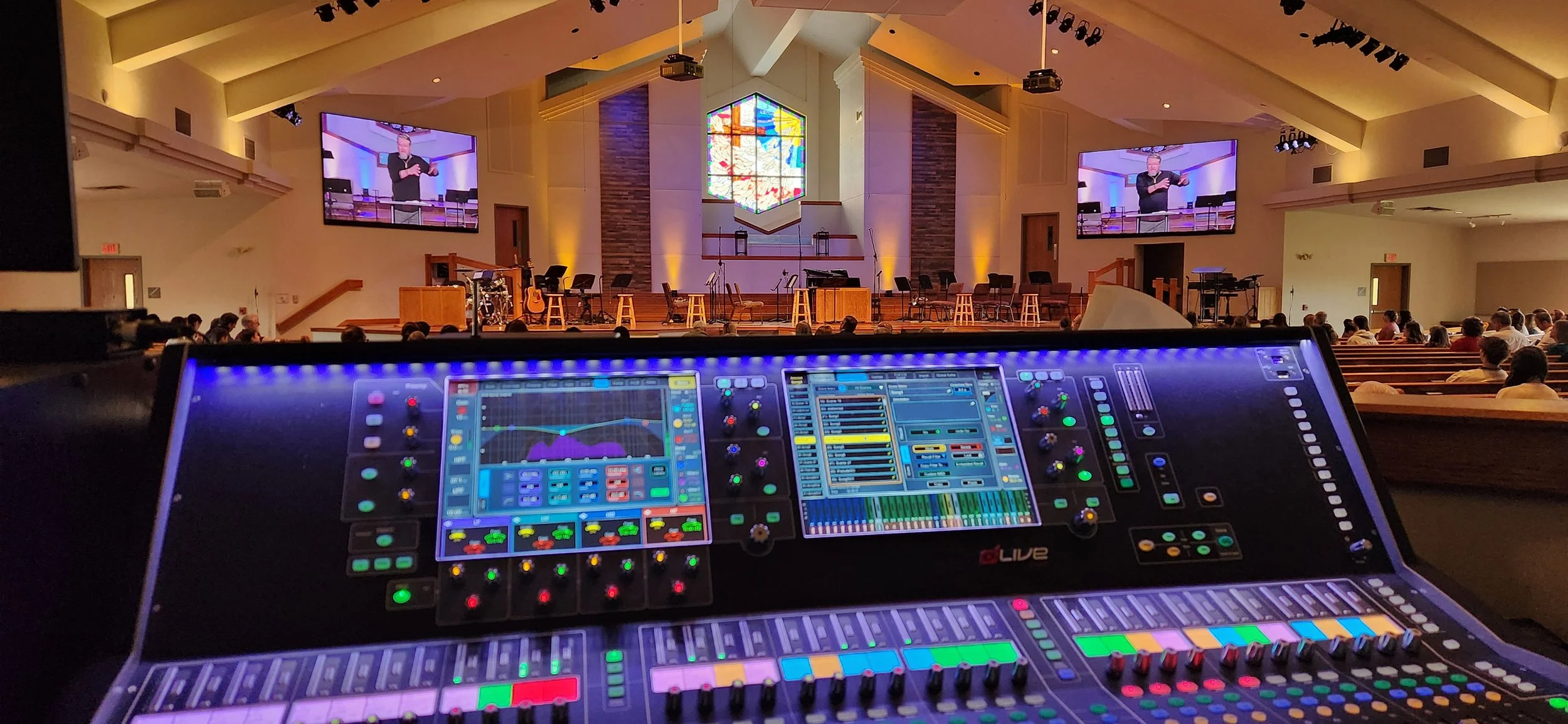
Most modern mixers can run entirely from an iPad, tablet, or touchscreen computer, and rack-mount mixers like the Violet Audio dMix 128 and mix engines like the Allen & Heath dLive range are controlled this way and cost less than a full console. Tablets are powerful tools, but for a main sanctuary with a live band, a dedicated physical control surface still has clear advantages.
Why a tactile surface wins during the service:
Eyes on the stage, not the screen. Physical faders and knobs build muscle memory, so the operator can make changes by feel while watching the pastor and worship leader.
Many moves at once. Two hands can ride several faders at once, such as bringing up the pastor's headset while pulling the band down during a transition. Touchscreens reliably handle only a touch or two.
Instant visual feedback. Motorized fader positions and lit mute buttons show the whole mix’s state at a glance, even after a scene change.
Precision. A long-throw fader lets you make smaller, smoother adjustments than a finger on glass.
Reliability. A surface doesn't depend on Wi-Fi in a crowded sanctuary, tablet batteries, sleeping screens, pop-up notifications or surprise software updates.
Volunteer confidence. New volunteers learn faster on physical controls, and the board is less intimidating than a stack of on-screen menus.
Where tablets and touchscreens shine:
Walking the room to adjust EQ, ring out monitors, and hear what the congregation hears.
Setting monitor mixes from the stage during rehearsal.
Smaller rooms such as chapels, youth rooms and fellowship halls, where a simple mix doesn't justify a full console.
Backup and remote access, so a technical director can check or rescue the mix from anywhere in the building.
Large touchscreen computers at the front of house give a big overview of routing, metering, and processing alongside a surface.
The best of both: Most churches are best served by a physical front-of-house surface for services, with tablets as a companion for setup, rehearsal, and walking the room. Rack-mount mixers controlled from browsers and tablets are a great fit for secondary rooms, broadcast mixes, and budgets where a surface isn't needed.
Consoles we recommend
Advanced Sound & Communication installs premium consoles from established manufacturers, including American brands where they fit:
Yamaha – A long-time standard in worship, with a range that scales from the compact DM3 and the DM7 to the CL and QL series and the flagship RIVAGE PM. Yamaha's Rio stage boxes and CL/QL consoles support Dante natively, so wireless receivers and recording and broadcast systems from other brands connect easily.
Violet Audio dMix128 – A new 4U rack-mount mixer with 128 channels of processing at up to 96 kHz, 32 analog inputs and 24 analog outputs, and redundant power supplies. It is built around open networking: AES67 is standard, along with SMPTE ST 2110-30, NMOS, MADI, and AES3, with Dante available through an option card. Control comes from browser-based software on any computer or tablet, and it integrates with Q-SYS and Crestron control systems. At a list price of about $5,995, it's a strong value for multipurpose rooms, broadcast and livestream mixing, or churches that want open-standard networking.
PreSonus StudioLive (PreSonus, Baton Rouge, Louisiana) – An approachable, volunteer-friendly console line with strong built-in recording for mid-size churches.
Avid VENUE S6L (Avid, an American company) – A flagship console for larger churches with full production teams.
Allen & Heath – The SQ, Avantis and dLive families are among the most popular consoles in worship, scaling from small sanctuaries to large multi-site campuses. They use Allen & Heath's own stage box links, with Dante available by option card.
DiGiCo – Premium touring-grade consoles for large churches with demanding productions.
Each line suits a different ministry size and style. The right choice depends on your input count, team skill level, livestream plans, and budget.
Get the right console the first time
Advanced Sound & Communication helps churches across the Kansas City area choose, install, and configure digital mixing consoles. We design the full signal path from stage box to speakers, build your scenes and layers, set up livestream and monitor mixes, and train your volunteers so they feel confident on Sunday morning.
Ready to upgrade your church's soundboard? Contact Advanced Sound & Communication at advancedsoundkc.com to schedule a console consultation.